
Designing game characters for 2D & 3D with Blender & Godot
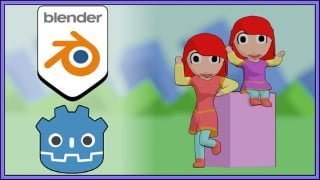

Learn how to design 3D characters with Blender and create cel shading effects for animated sprites. Export models and use shader editor for stunning visuals. Perfect for game designers and developers looking to create their own 2D and 3D resources.
What you’ll learn
- Designing 3D characters with Blender
- Create a cel shading effect
- Render images to be used as animated sprite
- Export model as glTF
- Use shader editor to create cel shading effect
- Use the action editor to create non linear animations
Hello and welcome.
If you are a game designer or developer who is interested in creating your own animated sprites for 2D games or models for 3D games, this course is for you.
This course focuses on the creation of 3D models with their own animations that you can use in both 2D and 3D environments.
For this, we will use Blender as a 3D editor and Godot as a game engine where we will test the resources.
In Blender, we will create two models. Both models will have a cel shading effect that will make them look like a 2D image.
Both models will have an animation that will be rendered to be used as sprites. In addition, we will export the 3D model so that it can be used in external applications.
In GODOT, we will import the resources we have created and configure them in a 2D and 3D environment.
In this course you will learn:
Designing 3D characters with Blender
Create a cel shading effect
Render images to be used as animated sprite
Export model as glTF
Use shader editor to create cel shading effect
Use the action editor to create non linear animations
This course may be attractive to you because it can help you to create some basic character models that can be used in a 2D or 3D video game that you can then customize in more detail in your personal projects.
In addition, you will have access to the content created during the course.
I hope you find the content useful and that you can apply it to your personal projects.
Have fun and happy learning.
Who this course is for:
- Designers and Game developers that want to create their how 2D and 3D resources with Blender
User Reviews
Be the first to review “Designing game characters for 2D & 3D with Blender & Godot”
You must be logged in to post a review.




There are no reviews yet.