
Unity 3D Mobile – Super Hero Simulation
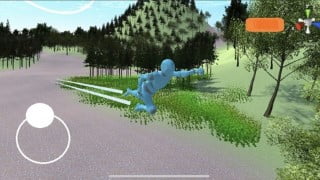

Learn to create your own animations and develop mobile 3D games in Unity. This course covers joystick and touch camera controls, terrain creation, and switching animator controllers. Get hands-on experience with UMOTION and find free character animations on MIXAMO. Discover how to use image references for custom animations and explore different ways to use audio sources. Perfect for anyone interested in mobile game development, animation creation, and Unity’s third-person controls. Start your journey into game development today!
What you’ll learn
- Learn to Create you own Animations with UMOTION
- Learn to use Mobile Joystick for 3d Games
- Learn to Use a Touch Screen For camera in UNITY
- Learn To use different Layer Mask and Switch The Animator Controller
- Learn how to use Buttons and Build a UI
You can adapt this course for your own projects, and any doubts you have you can ask me and I will must than happy to help you with your question. Sometimes to code and develop games can be scared, but Just keep studying and you will start to notice that to code is not that hard. I am able to help with it and togheter we will create this game .
Also if you have any idea for a course you might like, Just let me know and I will start to work in this project for you. Sometimes we have some questions and we look to find some course but we can’t find, so any ideas are really welcome, and we can do it .
In this course you going to learn how to use a Joystick to control the movements for a 3rd person controller. You going to learn how to switch animator controller and how to create your own animations.
We are going to see a lot of tools in the course, we are going to learn and use UMOTION it is a Free asset. I will help to Find a character to use in this course and how to get free animations using a MIXAMO .
We also going to learn how to create a Terrain , In this section I am going to teach you to find Textures inside the Asset Store and how to use it. I will teach how to Switch the Animator Controller for walk and flying .
We will see also different ways to use Audio Source., and how to apply example when the character is flying and is Far way to the ground we won’t listen the Nature sound from the forest in the game… and them when we fly down , towards to the ground we will start to listen again.
In the animations class I also will show you How to use a image as a reference to create your own Animation.
Who this course is for:
- Anyone who Wants to learn to make a Mobile 3D games in Unity Engine
- Anyone who Wants to learn how to Create Animations in Unity
- Anyone who Wants to learn how to make Terrain in Unity
- Anyone who Wants to learn to make A Mobile 3d , Using Joystick , and Touch Camera
- Anyone who Wants to learn how to Make a third person Control in Unity
User Reviews
Be the first to review “Unity 3D Mobile – Super Hero Simulation”
You must be logged in to post a review.



There are no reviews yet.