
How to Make a 2D Platformer with Unity & C#
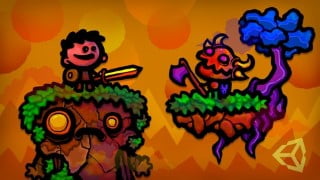

Learn how to create a fun and immersive 2D platformer game from scratch using Unity and C#. This course covers everything from player controls and enemy AI to level design and particle effects. Join our community of game creators and unleash your imagination!
What you’ll learn
- Learn how to make a 2D platformer player controller with wall jumping and sliding.
- Create unique enemy characters with simple but fun AI behaviors.
- Make moving platforms.
- Learn how to make a weapon pickup and switching system.
- Create an unlockable level menu.
- Make particle effects and add game juice, learning how to make attacks and jumps more satisfying and fun with sound effects and screen shake.
- Add parallax to give your 2D world more depth.
- Learn how to make your game environments shine with soft overlays, clouds, and small environmental pieces that react to the player.
In this game creation course, my brother and I will bring you through the process of making a 2D platformer game using Unity and C#.
This is an all-time classic genre, a blank canvas to let your imagination run wild!
—————————–
We’ll begin by learning how to make a solid player controller, with wall jumping and sliding. Then we will go on a fun journey bringing to life unique enemy characters such as a shooting warlock, a flying bat that avoids obstacles, and a patrolling goblin! So you can expect some simple but fun tutorials on AI.
You’ll learn how to make moving platforms, a flexible camera, and weapon pickup and switching.
If you’ve ever wondered how to make an easy unlockable level system, then that’s covered too!
Get ready to dive into the universe of particle effects and game juice, learning how to make attacks and jumps more satisfying with sound effects and screen shake for example!
I’ll share some useful and easy to implement tips and tricks to make your platformer game environments shine with soft overlays for lighting, parallax to add depth to the world, little trees and grass tufts which move underfoot and post-processing!
—————————–
Last but not least, by purchasing this course you’ll get access to all the project files. Lots of art, animations, code, sounds, and effects at your disposal! Whatsmore, you’ll be able to join the courses unique Discord server and chat with a community of game creators, ask for help if you get stuck, and share your hard work with fellow students!
I look forward to seeing what unique worlds you’ll bring to life with the course!
Who this course is for:
- A beginner/intermediate game developer interested in learning how to create a fun 2D platformer game from A to Z using Unity and C#.
- This course is also for those curious about programming AI using C#.
User Reviews
Be the first to review “How to Make a 2D Platformer with Unity & C#”
You must be logged in to post a review.



There are no reviews yet.