
Free Game Design Tutorial – Make a 3D side scrolling runner game in Unity.
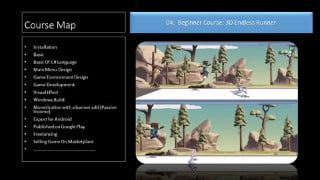

This free game development course is perfect for beginner and intermediate coders who want to become indie game developers. Learn Unity Game Engine, create your first project, design menus, code games, and more. Start your game development journey now!
Welcome Students:
Dear Developers. If you want to become a game developer, this is the right course for you. You will learn everything from the beginning. Don’t miss the opportunity. Make your first game.
This Course is Totally Free: nothing to pay just learn from the beginning.
What will you learn from this course :
1. Install Unity Game Engine.
2. Create your first project.
3. Learn the basics of game development.
4. Design Main Menu.
5. Scene Transition.
6. Main Menu Scripting.
7. Game Code.
8. Level Design.
9. Visual Effects
10. Build for Android.
11. Build for Windows.
12. Build for Webgl
13. Published On PlayStore.
14. Monetize your game
15. Complete Guide Line.
Game Engine :
I have used Unity Game Engine for this course. Unity Game Engine is a popular Game Engine.
Who this course is for:—-
Become an Indie Game Developer.
Make your first game
This course is for Beginner/Intermediate..
Anyone with a Basic level of coding and interested in learning Basic Game Programming
Complete beginners who are willing to work hard.
Developers who want to remake game development.
Start Your Game Development Journey
Basic Knowledge of Unity
Background Music Credits.
Carefree Melody by Twin Musicom is licensed under a Creative Commons Attribution 4.0 license.
Who this course is for:
- For Beginner/Advance
User Reviews
Be the first to review “Free Game Design Tutorial – Make a 3D side scrolling runner game in Unity.”
You must be logged in to post a review.




There are no reviews yet.