
Make an Open Source Drone: More Fun
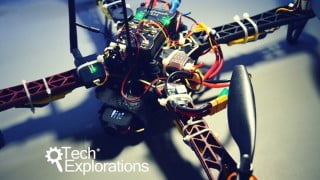

Learn how to improve your FlySky radio controller and take full advantage of your drone’s hardware. Set up radio telemetry, configure fail-safes, record HD flight videos, and design autonomous missions. Perfect for drone pilots looking to enhance their skills. Join us now!
What you’ll learn
- Improve the features of your FlySky radio controller so that you can take full advantage of the hardware.
- Set up radio telemetry between your computer and the drone so that you can track and control your drone from your computer in real time.
- Configure fail-safes to prevent avoidable injuries and damage to your drone.
- Record high-definition flight video and transmit first-person video to a monitor on the ground.
- Setup and configure flight modes.
- Design simple and more complicated missions that your drone can execute on its own.
In our first drone course “Make an Open Source Drone”, you learned how to build a quadcopter based on open source software and hardware.
You now have a modern programmable aircraft and a good understanding of the principles of drone flight and of the skills needed to enjoy being a drone pilot.
In this course, you’ll take your knowledge and skill to the next level. You’ll go past the basics and explore some of the most exciting features and capabilities of your drone.
Your drone, from simply reacting to your radio instructions, will look as if it has a mind of its own, and fly itself.
I promise, the first time you experience your drone flawlessly execute a mission, you will feel proud and thrilled.
By the end of this course, you’ll learn:
- how to improve the features of your FlySky radio controller so that you can take full advantage of the hardware,
- How to set up radio telemetry between your computer and the drone so that you can track and control your drone from your computer in real time,
- How to configure fail-safes to prevent avoidable injuries and damage to your drone,
- How to record high-definition flight video and transmit first-person video to a monitor on the ground,
- How to setup and configure flight modes,
- And most important, how to design simple and more complicated missions that your drone can execute on its own.
I invite you to review the free lectures in the first section of this course to find out more details about it.
If you are excited about learning how to to make your open source drone even more fun, join many other Makers and me in “Make an Open Source Drone: More fun”!
Who this course is for:
- Drone pilots who have a basic understanding of their aircraft and are ready to learn more.
- Graduates of Tech Explorations Make an Open Source Drone.
- Anyone interested in learning about the Ardupilot firmware and the Pixhawk flight controller.
User Reviews
Be the first to review “Make an Open Source Drone: More Fun”
You must be logged in to post a review.




There are no reviews yet.