
NetApp ONTAP Cluster Basics
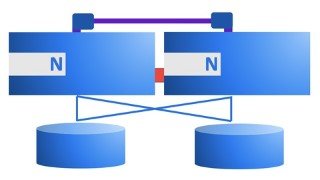

Learn the basic concepts of NetApp ONTAP cluster administration in this concise training. No prior knowledge required. Perfect for beginners and non-storage professionals who need to understand ONTAP terminology. Get familiar with networking, storage, command line, and more. Start your career in storage with NetApp, a leading storage/datamanagement company. Modules cover cluster setup, interfacing, physical and logical storage, networking, dataprotocols, and snapshots. Join now and gain the necessary skills to work with ONTAP.
What you’ll learn
- In this course you will learn about the basic concepts of a NetApp ONTAP cluster.
- You will get familiar with setting up networking and storage at a basic level.
- You will feel comfortable on the command line of the Clustershell.
- You will have enough luggage to carry on for a deeper dive in ONTAP.
Welcome to NetApp ONTAP Part 1.
This concise training, will help you to get started with NetApp ONTAP administration. No prior NetApp knowledge is required. It is not an in depth training, but it does contain lots of useful demonstrations to clarify the basic concepts and features of a cluster. This training may be useful to technicians who want to start working with ONTAP or to others who need to be able to converse with technicians regarding NetApp Storage environments.
If you want to move your career into the Storage direction, this training might be for you because NetApp is one of the leading Storage/Datamanagement companies, for on-premises as well as cloud solutions.
In 8 separate modules with short theoretical videos followed by demonstrations, you will set your first steps in getting familiar with NetApp ONTAP.
The 8 different modules:
1. The training starts with a module on what a NetApp ONTAP cluster is.
2. You will setup an ONTAP cluster using the NetApp simulator using ONTAP 9.9.1
3. Interfacing with ONTAP discusses the ways to connect to your cluster, using the command line interface and System Manager.
4. Physical storage deals with disks, raidgroups and aggregates.
5. Logical storage discusses flexible volumes and storage virtual machines.
6. Networking will focus on ports and logical interfaces.
7. The dataprotocol module deals with the relevant NAS and SAN protocols.
8. The training ends with an explanation and demonstration of working with Snapshots.
Who this course is for:
- Beginner Storage Administrators of NetApp ONTAP.
- Non storage people who have to be able to understand ONTAP terminology in order to be able to participate in storage discussions.
User Reviews
Be the first to review “NetApp ONTAP Cluster Basics”
You must be logged in to post a review.



There are no reviews yet.