
Learn to create a GIS tool in Python
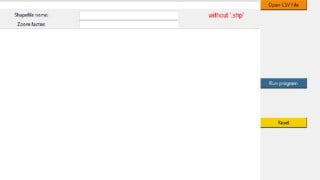

What you’ll learn
- Learn to use Python libraries for GIS tool
- Learn to use the Shapefile library
- Learn to use Tkinter to create GUI
- Learn to export to CSV
Have you ever wanted to create a tool that you can use whenever you want to make a repeated operation? Now you can. You learn the basics of Python and apply it in a scenario, to create your own tool.
The tool can be executed via Python IDLE or make it a stand alone software, that you run by double-clicking it.
The subject itself is less important. What matters is the manner in which you can play with the tKinter library, designing the software look, coding the Menu functionality, program design: add buttons, add text fields, importing a file (in this case a csv file), perform calculations in the background, display error messages and using the Pyshp library to export everything to shapefile, but most important is to make a runnable tool. This will teach you exactly that!
The GIS field is becoming a very competitive and innovative field. By learning this skill you improve your CV. This can be very useful in the future.
This video series will assume you have some basic knowledge of Python. Otherwise, please also consider our Introduction to Python course.
I am always open to collaborations, to feedback and while I hope that this course will have explained everything thoroughly, I am not a full time programmer, rather a GIS specialist with some Python knowledge. For more in-depth Python lessons and explanations please consider other Python based courses.
Who this course is for:
- GIS Professionals
- Python intermediate level students
User Reviews
Be the first to review “Learn to create a GIS tool in Python”
You must be logged in to post a review.




There are no reviews yet.