
How to Create a Digital Planner Using Canva

Learn Affinity Publisher from scratch and create stunning sales banners, magazines, brochures, book covers, and more. Enroll now and start your journey in graphic design with this comprehensive course. Perfect for beginners and content creators looking to enhance their skills.
What you’ll learn
- How to create pretty patterns using Canva
- How to create a digital planner cover
- How to create x4 different planner pages
- How to add tabs and binder rings to your digital planners
- How to hyperlink your digital planner tabs using Canva and PowerPoint
- How to add shadows to your tabs using PowerPoint
- Harness new Canva design techniques
- Bonus tutorial: How to create digital stickers using Canva
If you want to create digital planners using Canva for personal use or to build your business but don’t know where to start. This course is for you!
Hi, I’m Olivia, your teacher for this course. I have spent years perfecting my digital planner designs using Canva and have learnt easy techniques and tools that makes creating digital planner easy yet effective.
Creating digital planners using canva is easy and, most importantly, FREE!
You’ll learn many Canva tips, tricks and techniques to help you design engaging and sell-worthy digital planners.
What you’ll need:
Access to Canva (free to use)
Microsoft PowerPoint
Preferably a desktop or laptop. However, you can also use an iPad or tablet – whichever works best for you
And the tenacity to learn new skills
You’ll be creating:
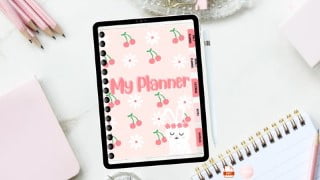
A cute bunny cherry digital planner, using the techniques and tips from this course
Free digital downloads included:
Cute bunny digital planner
Digital planner templates
Digital stickers
Resource sheet
Inspiration sheet
All these free digital products are for you to help you in your digital planner business journey.
I want you to succeed!
This course is for complete beginners, so don’t worry if you’re new to creating digital planners. You’ll find that using these Canva tools and techniques is straightforward and will help you build your digital product empire or on your way to becoming an incredible digital planner creator with ease.
Let’s get creating! I can’t wait to see your designs.
Who this course is for:
- Beginner digital planner creator with no graphic design experience, looking to learn how to create digital planners using Canva
User Reviews
Be the first to review “How to Create a Digital Planner Using Canva”
You must be logged in to post a review.



There are no reviews yet.