
Learn Adobe InDesign: By Creating a Recipe Card
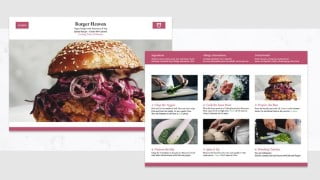

Learn Adobe InDesign CC for Beginners: Create a Cookbook with Grids, Paragraph Styles, Resizing Images, Shapes, and Shortcuts. Master essential InDesign skills and create stunning PDFs with guides, margins, and efficient document setup. Explore image placement, text formatting, and the Content-Aware Fit Tool. Discover the power of Paragraph and Character Styles, Gridify, and shortcuts. Suitable for beginners and students with basic InDesign knowledge. Downloadable files included. Start loving InDesign and conquer your fear today!
What you’ll learn
- Adobe InDesign
- Setting up a Document
- Pages
- Guides
- Shortcuts
- Paragraph & Character Styles
- Shapes
- Images
- Gridify
- Duplicating
- Typography
- Saving & Exporting
Show moreShow less
Learn Adobe InDesign CC for Beginners: Create a CookBook with Grids, Paragraph Styles, Resizing Images, Shapes & Shortcuts, Content Aware Fit & PDF.
Ready to put your Adobe InDesign fear to bed and start loving InDesign?
We will learn a whole bunch of InDesign skills by creating a two-page Recipe Card.
When creating this stunning PDF from start to finish- We will cover all InDesign Essentials and Shortcuts.
From how to set up a document efficiently with guides and margins. To placing Images, Icons and also best practice for text.
Resizing and scaling images with Automatic Frame fitting Options and the new Content-Aware Fit Tool ( Which is done with a click of a button)
It is especially a great introduction to InDesign’s Paragraph & Character Styles– One of the most useful tools for Text.
Gridify will also be introduced- Which is a cool name for Creating Grids in InDesign!
I am obsessed with shortcuts so you will definitely learn a few!
What we will cover:
– Setting up a Document
– Guides
– Shortcuts
– Tools
– Shapes
– Colours for Print/Web
– Images
– Gridify
– Duplicating
– Text Formatting
– Paragraph & Character Styles
– Saving & Exporting
Files:
You will see a downloadable Zip file – If you double click on it, it will expand into a folder and you can access the files inside.
The Zip file includes:
Images
Fonts
Adobe InDesign File
InDesign versions:
Adobe InDesign CC 2021 is used here but all versions of InDesign are suitable (CS4 – CC 2021)
I am around to help so if you have any questions or feel stuck, drop me a line and I will get back to you promptly.
Are you ready to create your own Recipe Card?
Who this course is for:
- Beginners
- Students with basic InDesign knowledge
User Reviews
Be the first to review “Learn Adobe InDesign: By Creating a Recipe Card”
You must be logged in to post a review.




There are no reviews yet.