
Passive Income: Create Stickers For Digital Planners To Sell
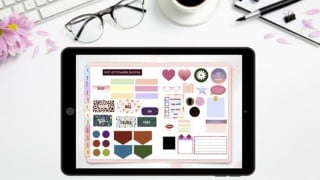

Learn how to create your own digital stickers for your digital planners and make passive income by selling them on platforms like Etsy. Become an expert in using keynote and importing planners into your PDF reader. Join this class and unleash your creativity!
What you’ll learn
- Learn how to create your own digital stickers for your digital planners from scratch
- Become an expert in using keynote
- Learn how to import planners into your PDF reader
- A way to make passive income on platforms such as Etsy by selling digital products
Hi Everyone,
I’m Janna, by day analyst, by night digital designer.
I first came across digital planning a while ago and was intrigued how they are made, all the functionalities and found it difficult to find videos on how to create a digital planner from scratch and how to create stickers. Digital Planning has changed my life and I love how customisable they are and how personal you can make them!
I’ve created this video to share how to create digital stickers in keynotes for your personal digital planners or if you wanted to create stickers to sell on Etsy for passive income.
Passive income has grown the last year and selling digital downloads such as planners, digital art, templates is an exciting and simple way to earn passive income. You store no stock and create a product once to be sold multiple times.
I will be creating multiple videos on how to create different digital downloads to sell and how to list them on sites such as Etsy or your own website.
For this project you will need an iPad, a stylus as well as a PDF reader (I use GoodNotes) but any PDF reader will work well with this.
This class will feature the following topics:
How To Create Shape Stickers
How To Create Stickers With Image Backgrounds
How To Create Notebook Stickers
How To Create Text Stickers
How To Create Different Icon Stickers
How To Copy Stickers Into GoodNotes & Your Planner Page
I would love to see what designs everyone creates, please share your projects with me and the stickers you create following this tutorial.
You will have access to all of the stickers we learn to create in this tutorial at the end for FREE! I hope you like using them in your planners.
I hope you find this tutorial useful and thank you for taking the time to attend my class.
Please view my other classes around digital designing where I go over in depth how to create your own planner from scratch in various applications as well as videos I will be uploading in the next few weeks on making passive income with digital downloads.
Who this course is for:
- Digital planner enthusiasts
- People who want to create a passive income business
- Sellers for platforms like Etsy
- Digital designers
- Anyone & everyone
User Reviews
Be the first to review “Passive Income: Create Stickers For Digital Planners To Sell”
You must be logged in to post a review.



There are no reviews yet.