
Free Procreate Digital Illustration App Tutorial – Seascape Digital Painting with iPad Procreate for Beginners
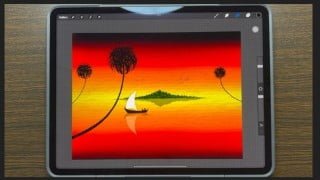

Learn how to create stunning digital paintings on iPad Procreate software with this beginner-friendly course. From creating a canvas to using various tools and techniques, you’ll master the art of painting seascapes, sunsets, and more. Join now and start your artistic journey!
This course is designed for anyone and everyone who wants to start painting on iPad Procreate software. This course will teach you how to paint an easy and stunning seascape sunset digital painting using Procreate software on iPad. Each and every element drawn or painted is demonstrated and explained step by step in a very easy and simple way.
What topics are covered in this course?
How to create canvas
How to use drawing tools like Color, Brush, Smudge, Eraser tool etc
How to use editing tools like Selection, Actions, Adjustment tool etc
How to use Layers tool. (Layers is confusing subject for many users especially who are at starting stage or who has just started digital painting using iPad procreate software. This course covers deep explanation on layers tool)
How to use vibrant colors to create vibrant sky painting
How to use appropriate brush to draw and paint island
How to use selection tools to create island shadow
How to use various tools to draw and paint boat with sails.
How to draw coconut trees (or palm trees) using reference shapes and lines and easy techniques
How to insert a photo
How to add paper background effect
How to export the painting to social medias
How to save the painting as image
See you inside!
-Srinivas
Who this course is for:
- Beginners who want to start drawing with Procreate
User Reviews
Be the first to review “Free Procreate Digital Illustration App Tutorial – Seascape Digital Painting with iPad Procreate for Beginners”
You must be logged in to post a review.




There are no reviews yet.