
Photoshop for Fashion Photographers
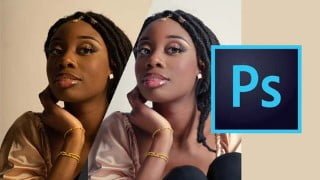

Learn how to professionally retouch pictures in the studio using Adobe Photoshop. This tutorial explains all the terms and processes, making retouching accessible to beginners and professionals. Enhance your skills and deliver your best work for E-commerce, magazines, catalogs, banners, and ads. With step-by-step instructions, you’ll understand the complete workflow and be able to try the techniques on your own pictures. This course is perfect for anyone looking to improve their Photoshop skills and create stunning image compositions, website mockups, and effects.
What you’ll learn
- In this video, you will learn how to retouch a picture shot professionally in the studio.
- Retouching is all about bringing the best out of someone, making them look like on their best day; that means keeping the skin, the shapes, the colors, etc..
- Retouching is a very much popular image editing service for E-commerce, magazine, catalog, banner and Ad design.
- In this tutorial, all the terms and processes are thoroughly explained to make the retouching accessible to everyone who needs it.
Learn Adobe Photoshop : For Fashion Photographers, you will know how to retouch a picture shot professionally in studio with Adobe Photoshop.
Retouching is all about bringing the best out of someone, making them look like on their best day; that means keeping the skin, the shapes, the colors, realistic. The goal is not to create something natural looking.
Photoshop could be intimidating, when you want to learn every feature, but we made this course short and focused so you won’t get lost. You’ll learn some professional technique, using camera raw, photoshop tools like patch tool, local and global dodge and burn, liquify, frequency separation and you’ll also have some great tips to get the best results.
Retouching is a very much popular image editing service for E-commerce, magazine, catalog, banner and Ad design.
In this tutorial, all the terms and processes are thoroughly explained to make the retouching accessible to everyone who needs it, you’ll soon be able to enhance your photoshop skills and deliver your best work.
You can follow this tutorial, even if you have just started with photoshop, step by step you’ll understand the complete workflow, and you may want to try everything you’ve learned on your own pictures.
Who this course is for:
- This course is devoted to beginners and professionals. It is widely used for image editing, retouching, creating image compositions, website mockups, and adding effects.
User Reviews
Be the first to review “Photoshop for Fashion Photographers”
You must be logged in to post a review.




There are no reviews yet.