
Blender for 3D Printing – Design a Pet Product (203)
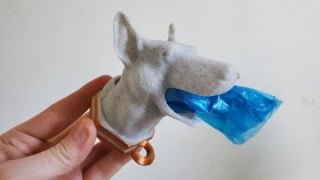

Learn intermediate Blender techniques for designing complex 3D printed products. From sketching to manipulating Blender’s bolt factory, this course has it all. Boost your creativity and become a professional 3D print designer. Join now!
What you’ll learn
- Intro to Blender’s Bolt Factory
- Rapid Prototyping Techniques
- Design a 3D Printed Product Quickly
- Flexible Sculpting Workflow
- Design Fundamentals for 3D Printing
- Basics of 3D Modeling for 3D Printer
- Prototyping for 3D Printed Products
- Theory of 3D Designing for a 3D Print
- Blender Product Design Overview
- 3D Printing Tool Box – FREE Blender Add On
- Bool Tool – FREE Blender Add On
- How to Design for No Rafts & No Supports
- How to build “Flexible” Design Projects like a Pro
- Blender Modeling and Sculpting for 3D Printing Workflows
- Easy Guide to Prototype Modeling
- Adaptive & Flexible Design Techniques
- Practical Designing Theory + Application
Show moreShow less
What You’ll Learn
In this intermediate course we’ll be tackling a complex product design of a dog inspired pet product. You’ll learn the steps to approaching a completely original product design. Everything from sketching ideas, using reference images, how to manipulate Blender’s bolt factory, and more.
THIS IS AN INTERMEDIATE COURSE:
This course is not a beginner course. If you are not comfortable in Blender please see our suggested pre-requisites below;
Pre-requisites:
Blender for 3D Printing – Beginner Basics & Effects (101) on Udemy.
What to Expect:
Watch Time: 3 hrs
Design Estimate: 6 hrs
Product Design Planning
Reference Image Workflows
Intro to Blender’s Bolt Factory
Rapid Prototyping Techniques
Course curriculum:
[EARLY ACCESS COURSE]
Pre-Production Workflow
Project Overview & Multiple Drafts Workflow
Sketch Out Ideas (Paper or Grease Pencil)
Get Photos References
Reference Object Measurements
Design Poop Roll & Leash Objects
Design Your Product Shape
Add Photos
Blocking the Dog Head
Blocking the Jaw & Ears
Blocking Neck (+ Modifiers)
Create Mouth Hole for Thumb
Leash Clips & Screw-On Base
Add Leash Clips
Create a Bolt Collar
Create a Neck Nut
Fix Collar with 3DP Toolbox & Booleans
Design Adjustments
Cut Poop Roll Hole
Add Poop Loop
Add Roll Spikes
Check Mesh for Overhangs
Add Text (optional)
Add Sculpting Details
Prep for Sculpting
Sculpting the Broad Shapes
Sculpting the Medium Details
Prep for 3D Printing
Export for 3D Printing
Slice Prototype for 3D Printing
Final 3D Print (Timelapse)
Outro
We can’t wait to see what you create.
Again, In this intermediate course we’ll be tackling a complex product design of a dog inspired pet product. You’ll learn the steps to approaching a completely original product design. Everything from sketching ideas, using reference images, how to manipulate Blender’s bolt factory, and more.
Who this course is for:
- Intermediate Blender for 3D Print Design Users
- Students who want their design ideas to be 3D Printed.
- Students who want to learn flexible design skills to 3D Print their ideas into reality.
- 3D Printer users who want to start 3D Printing their own creations.
- Students interested in 3D Product Design for rapid prototyping.
- Those who want to join an online community of 3D Designers to grow their skills.
- Someone who wants to boost their creativity.
- Someone who wants to become a Professional 3D Print Designer.
User Reviews
Be the first to review “Blender for 3D Printing – Design a Pet Product (203)”
You must be logged in to post a review.




There are no reviews yet.