
Blender Basics: Trippy Animation Loop
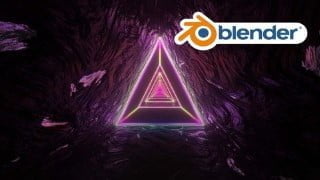

Learn the basics of Blender 3D and create stunning looping animations. This course is perfect for aspiring 3D artists and beginner Blender users.
What you’ll learn
- Learn from Basics: Learn the interface and shortcuts.
- Learn Modeling, Node Shading, Animation Basics
- Camera animation in Blender 3D
- Creating a scene & animation that loops seamlessly
In this class, you will learn how to make a looping animation in Blender 3D.
You will learn various techniques & tools that you can use for motion graphics projects in general such as:
Learn Modeling Basics
Learn Node Shading Basics
Learn Animation Basics
Export setting in Blender 3D for Instagram.
Camera animation in Blender 3D
Creating a scene & animation that loops seamlessly
In this class we will go through the download and installation process of Blender, and then we start by setting up blender and go through a quick 5 minute crash course of the interface, into modeling, shading and animating the Trippy Loop and finally render.
In the Tips and tricks, we add sound/music to the animation and I show you how to setup your blender startup file and more.
This class is suitable for users of all levels. Beginners who have not used the software before will be able to follow along.
For the class project create a trippy loop in Blender 3D. Use what you learned in the class to make something that looks different. For example, using different Texture shader nodes, colors, different world shading.
When you finish your project, please feel too share your work with the class community on Discord!
If you need any help use the community section or the Discord server and I will respond as soon as I can. Please remember to add screenshots!
Who this course is for:
- Aspiring 3D Artists
- Beginner Blender Artists
User Reviews
Be the first to review “Blender Basics: Trippy Animation Loop”
You must be logged in to post a review.



There are no reviews yet.