
BLENDER Create Living Room From Single Image + Robot, 4h30M
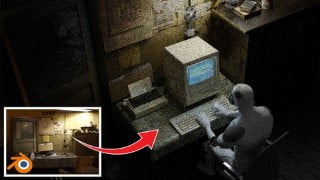

Learn how to use Blender, a free 3D software, to create stunning animated scenes. This tutorial covers modeling, texturing, lighting, and more. Achieve a cinematic look and create realistic results in just 4 hours and 30 minutes. Includes a bonus tutorial on creating an Old Apple Macintosh computer. Perfect for anyone wanting to learn Blender and create their own movie scenes.
What you’ll learn
- How to use free 3d software Blender
- How to create an animated scene
- Modeling, texturing, lighting, UV-editing, animation, camera setup, post-processing and more
- How to achieve a cinematic look
Hello everyone, in this 4 hours and 30 minutes long tutorial we will make a movie scene using mostly only one photo. I will teach you how you can achieve a realistic result in the fastest way.
After creating the scene with the living room, we will create and animate the robot and insert it into the scene.
Since the scene also uses the Apple Macintosh computer that we created in my last tutorial, all buyers of this tutorial will receive an “Old Apple Macintosh tutorial for free” as a gift.
Part of the post-processing is done in After Effects (the last half hour of the tutorial). If you’re not using After Effects, that part isn’t necessary.
Language: English + subtitles
Duration: 4 hours 30 minutes + Apple Macintosh tutorial 2 hours 40 minutes (in Resources)
Video resolution of the tutorial: 2k
final .blend file included + all resources
In the tutorial we talk about: Modeling, texturing, lighting, UV-editing, animation, camera setup, post-processing and more
PART 1 – 1:21:20
Intro
Parquet creation (UV editing and texturing)
Table and tablecloth creation (cloth simulation)
Door modeling and texturing
Camera setup and lighting
PART 2 – 1:28:39
Cabinet modeling
UV editing
Modeling a metal lamp
Import assets in the scene
Light blinking effects
PART 3 – 1:05:02
Creating robots
Adding greebles
Robot texturing
Animating a robot
PART 4 – 39:28
Camera setup
Rendering
Creating a bokeh effect in the background
Post-processing in After Effects
GRATIS TUTORIAL – Old Apple Macintosh Cinematic look tutorial – 2 hours 40 min (in resources)
Who this course is for:
- Anyone who wants to learn how to use the 3D software Blender and how to create a movie scene
User Reviews
Be the first to review “BLENDER Create Living Room From Single Image + Robot, 4h30M”
You must be logged in to post a review.





There are no reviews yet.