
Learn Blender In 3.5 Hours – Beginner Friendly
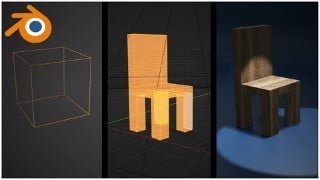

Learn Blender in just 3.5 hours! This course covers everything from the Blender interface to creating 3D models and animations. No experience required. Perfect for anyone interested in learning Blender and 3D animation. Download your free copy of Blender and start creating amazing 3D art today!
What you’ll learn
- Learn how to use Blender to create your own 3D Models
- Create cool 3D Animations using keyframes
- UV Unwrapping your 3D models
- Adding Textures and Materials to your 3D Models
- Render your final 3D Animation using Cycles or Eevee
Welcome to “Learn Blender In 3.5 Hours“! Thank you so much for considering this course! You will not be sorry I promise…
I’ve designed this course in such a way, so that anyone interested in Blender or 3D Animation can start learning everything you need to know, right now! – No 3D experience required at all!
But this course is also not just for complete beginners, I am sure you will find a chapter where you might just learn something new. This course covers everything from The Blender Interface to your Final Render using either the Eevee or Cycles render engines.
You will learn how to create your own 3D models, UV unwrap them, apply custom textures and materials, adding lights and an HDRI to your scene, and animate everything using basic keyframes. You will learn all this and much more in just 3.5 hours! Have a look at the list of lessons below:
Lesson 1 – The Blender Interface
Lesson 2 – Basic Navigation
Lesson 3 – Adding Objects To Your Scene
Lesson 4 – Move / Scale / Rotate & Duplicate
Lesson 5 – Edit Mode Part 1 – Vertices / Edges / Faces
Lesson 6 – Edit Mode Part 2 – Subdivide Edges & Faces
Lesson 7 – Edit Mode Part 3 – Loop Cut / Extrude / Inset / Bevel
Lesson 8 – Edit Mode Part 4 – Creating and Deleting Faces
Lesson 9 – Edit Mode Part 5 – Separate & Join
Lesson 10 – Origins
Lesson 11 – The 3D Cursor
Lesson 12 – Creating Your First Model (A Basic Chair)
Lesson 13 – Keyframe Animation
Lesson 14 – Modifiers
Lesson 15 – UV Unwrapping
Lesson 16 – Creating Your First Material
Lesson 17 – Adding Lights & An HDRI To Your Scene
Lesson 18 – Adding A Camera To Your Scene
Lesson 19 – Rendering With Eevee & Cycles
So buckle up – During the next 3 and a half hours, you will learn EVERYTHING you need to know to start creating your own amazing 3D art and 3D animations!
Download your free copy of Blender and become the 3D artist you’ve always dreamt of becoming!
I am using Blender 3.2 during this course, but you can follow along using any Blender version which is currently available.
Let’s create some amazing 3D art – see you in the first lesson!
Who this course is for:
- Anyone interested in learning Blender
- Anyone interested in learning 3D Animation
- Anyone interested in learning how to create 3D Models
User Reviews
Be the first to review “Learn Blender In 3.5 Hours – Beginner Friendly”
You must be logged in to post a review.





There are no reviews yet.