
Blender: Create a stylized sword
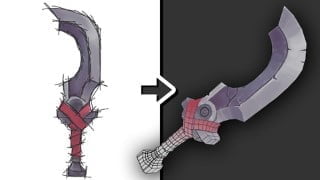

Learn how to create stunning low poly 3D art with Blender. This course teaches you the techniques of UV unwrapping, texture painting, and more. Perfect for beginners and those interested in game and animation design. Create a cool stylized sword and showcase your skills with two renders. Start your journey into the world of 3D modeling today.
What you’ll learn
- Use 2D concept art to create 3D models.
- Various 3D techniques which will result in lowpoly topology. (perfect for games and animations)
- Uv Unwrapping
- Combine multiple UV maps to create one singular texture map.
- Various texture painting techniques.
- Rendering
About this course:
In this course, you will learn how to create a 3D low poly stylized sword in Blender.
Creating 3D art that stands out is more than just creating a complex 3D model. With in-depth knowledge about textures, you can create amazing 3D art using low polygonal 3D models. These models can be used for games, animation, and much more.
To enjoy this class, basic knowledge of blender is helpful, but the course is designed for beginners so the tasks will be simple and are explained in video and audio.
Course breakdown
In the first lesson, we start with a concept created by Becca Hallstedt
download the file named: sword outline. This outline is all you need, to complete the 3D model.
After exploring the concept we start to create the 3D model. when the 3D model is finished, we will UV unwrap the model and start to texture paint.
The sword is done after texture painting, and as an assignment for this class, I would gladly receive 2 renders from your finished sword. (the assignment is also explained in the last video of this class.)
Assignment:
Beauty Render: Render the sword in a cool orientation.
Wireframe Render: Render the wireframe of the sword.
Who this course is for:
- Beginner blender users who want to create a cool sword.
- Anyone who wants to create cool stylized 3D models.
- Anyone who wants to know how to texture paint inside blender.
- Anyone who wants to create a Lowpoly 3D model which is perfect for games and animations.
User Reviews
Be the first to review “Blender: Create a stylized sword”
You must be logged in to post a review.



There are no reviews yet.