
Create a Marble Run Animation in Cinema 4D
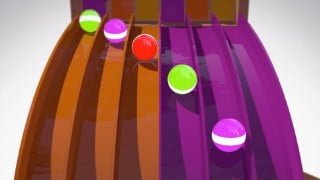

Learn to create a stunning marble run animation in Cinema 4D. This beginner to intermediate course covers 3D simulation, modeling, sound design, and post-production techniques. Perfect for aspiring 3D artists.
What you’ll learn
- Learn to start a 3D simulation using a variety of techniques; mograph cloner, push start and conveyor
- 3D Model the components of the marble run
- Set up cameras and optimize render settings
- Sound design using Garage Band
- Post-Production using Adobe After Effects
Welcome to this course, Animate a Marble Run in Cinema 4D. This is a beginner to intermediate course and a basic understanding of Cinema 4D’s user interface is recommended.
In this series of lessons we will cover the fundamentals of 3D Simulation, dynamics and 3D modeling to help you gain an understanding of the tools and techniques used in the industry. Students will apply that knowledge to develop a motion graphics project consisting of a marble run. This course will also cover using garage Band for sound design and Adobe After Effects for Post-Production.
The topics this course will cover include the following:
01_Inspiration
An introductory overview of project, inspiration images, planning and sketching a design.
02_Start Options
Use of the MoGraph cloner to start the marble run
Animating the count of the MoGraph cloner
Creating a push start mechanism
Adjusting the F-Curves and creating a looping animation
Duplicating the push start and offsetting the animation in the dope sheet
Create a conveyor to start the simulation
3D model the conveyor using splines, the mograph cloner, and collider body tags
Create a looping conveyor animation
Add side wall geometry to prevent the spheres from falling off the sides of the conveyor
03_Modeling
Walkthrough of the instructor’s project, components to be included and creating a seamless loop
3D model the straight slides and a corner component using parametric primitives
Assign collider body tags to all components
Adjust project settings for realistic simulation
Model the curved slides using splines in conjunction with the sweep nurbs object
Adjust the profile spline for accuracy
Create corner turns
Overview of structural components to add realism to the scene
Create an obstacles for the marbles to interact with using the mograph cloner and random effector
04_Cameras and Rendering
Use cameras in conjunction with the stage object to set up composition and transitions
Animate cameras to follow the movement of the marbles and highlight the main animation
Learn to optimize your scene for faster render times
Set-up render settings for final output; output, save path, anti-aliasing, frame range
05_Sound Design
Use royalty free sound files to create the sound design for your animation
Use Garage Band to accurately place the sound effects to sync with the animation
Automate each tracks volume to adjust the fade out of each sound
Export sound design as a .wav file
06_Post-Production
Composite sound and animation together
Use Adobe After Effects to enhance the final appearance of the animation
Add blurs, tints, glows, vignettes and curves adjustments for added visual interest
Export the final animation as a .mov file through Adobe After Effects
Who this course is for:
- Beginner to intermediate 3D artist interested in learning Cinema 4D
User Reviews
Be the first to review “Create a Marble Run Animation in Cinema 4D”
You must be logged in to post a review.




There are no reviews yet.