
Introduction to MASH for Maya
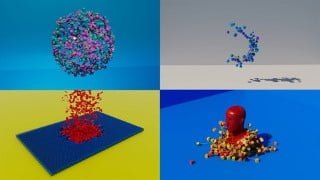

Learn the power of MASH for Maya with this beginner-friendly course. Create complex simulations and animations with ease using this plugin.
What you’ll learn
- Learn the different nodes that MASH has to offer
- Learn how to simulate dynamic simulations with MASH
- Learn how to render simulations with Arnold Renderer
- Complete a final assignment with the skills learnt in the course
MASH is a very powerful Motion Graphics and Visual Effects plugin that now ships with Maya. It is a procedural system that allows you to create complex simulations and animations with an easy-to-use interface.
The simulations that MASH can produce are insane and when paired with the Arnold Renderer which now also ships with Maya you can get some fantastic results!
The only pre-requisite to this course is a basic understanding of navigating Maya. The rest I will teach you from the ground up across 5 different exercises. You will also need an installation of Maya from 2017 onwards.
In this course I will teach you the fundamental skills and techniques that you need to get started in MASH. I will run through the nodes and utilities that I use most frequently within my MASH workflow which will prepare you to be able create unique procedural simulations.
Course outline
Lesson 1 – Know the Nodes (An introduction to the most frequently used nodes in MASH)
Lesson 2 – Rendering our simulation (A walkthrough of the best practices for rendering MASH simulations with Arnold)
Lesson 3 – Dynamics (An introduction to the Dynamics node and the accompanying Bullet Solver)
Lesson 4 – Using Custom paths (This lesson will take a look at the curve node and how we can build our own custom paths for MASH)
Lesson 5 – Dynamics Part 2 (This lesson will take a more advanced look into MASH dynamics and how we can have two different MASH networks interacting with one another)
Lesson 6 – Disintegrating Text (Learn how to disintegrate a mesh with MASH)
Project Task (Assignment) – (This lesson will walk you through the final assignment that you have been tasked with, summarising the skills and techniques learnt in this course)
The course will finish with a really fun assignment where you will have the option to practice the skills that you have learnt in this course! I’m looking forward to seeing what you guys create so please upload your work!
For the Class project, please see a detailed outline in ‘Project Task (Assignment)’.
You will be creating animated avatars, the like of which can be found in ‘Major Lazers – Light it up’ music video.
For further details please see a detailed outline in Project Task (Assignment)
I hope you enjoy this course as much as I enjoyed creating it!
Who this course is for:
- Beginners to MASH for Maya
User Reviews
Be the first to review “Introduction to MASH for Maya”
You must be logged in to post a review.




There are no reviews yet.