
Camera Matching 3D into Video | 3ds Max 2022 + After Effects
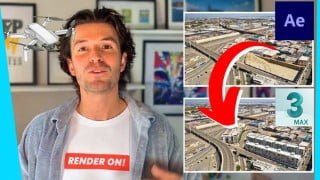

Learn how to merge 3D buildings into drone footage using After Effects and 3ds Max 2022. Create photorealistic renders and enhance your CGI portfolio with this comprehensive course. Suitable for beginners and experienced artists. Get the training you need to excel in 3D CGI.
What you’ll learn
- Complete up to date workflow!
- Use After Effects and 3ds Max 2022 to merge your 3d building into drone footage.
- How to prepare your drone footage
- You will 3d camera track 2d video footage
- Set up video in 3ds max viewport background
- Import a 3d building into 3ds Max
- Import Camera tracking data from After Effects into 3ds Max
- You will use the V-Ray Clipper
- Learn how to exclude certain parts of your model from the render
- You will add materials
- Match the lighting of the footage in 3d
- Add layers in the V-Ray Frame Buffer
- Render an animation
- Composite the animation into the 2d footage
- And so much more!
Show moreShow less
FULL UP TO DATE COURSE TAUGHT BY AN OFFICIAL V-RAY MENTOR.
Use 3ds Max to add renderings to your camera footage.
CGI workflow explained in an understandable teaching style by an Official V-Ray Mentor. Start creating photorealistic renders, build an amazing CGI portfolio and launch your career.
Create better images, get more clients, with less effort.
Who is it for?
Anybody who wants to be able to offer 3d animation merged with video footage. Regardless of previous experience, it will work for anybody that wants to create professional 3D renders.
How does it work?
You watch the videos, complete the exercises, and start building your skills. You can ask questions in the community group as well as post work and receive feedback.
Why does it exist?
I was where you are now. I was frustrated that there was nothing that showed how to create photorealistic images in an understandable way. This shows you how, step by step, it works, and 10,000 happy students agree.
The Promise of the Course
You will learn how to create a portfolio of photorealistic images using industry tools and workflows, with ongoing support that will build confidence, increase work quality and get clients.
Get the 3D CGI training you need. Learn 3D CGI from an expert with simple, hands-on training.
1 of only 28 Official V-Ray Mentor in the world and Autodesk University Speaker.
*Completely updated with the latest V-Ray 5 and 3ds Max 2022 updates*
UPDATE – ⭐ Introduction to 3ds Max added
Whilst the course is made to be as beginner-friendly as possible, a new section called Introduction to 3ds Max has been added. This is if you want to brush up on the basics before you begin, have been away from 3ds Max for a while, or are completely new. Just scroll down in the lectures until you see Introduction to 3ds Max. I hope this helps!
Who this course is for:
- 3D Visualisation Artists
- 3D Artists
- Students and aspiring CGI artists
- Photographers and designers
- CGI Professionals
- Interior Designers, Architects, 3D Generalists
- 3D Visualization Artists, 3D Artists, 3Ds Max Users
- New and experienced 3ds Max users who want to create photo realistic 3D renderings.
User Reviews
Be the first to review “Camera Matching 3D into Video | 3ds Max 2022 + After Effects”
You must be logged in to post a review.



There are no reviews yet.