
3D Modeling Furniture with SketchUp – Shaker Style Table
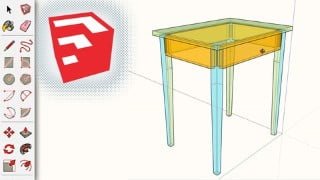

Learn furniture design and woodworking with SketchUp. This beginner-level course teaches you the basics of furniture design, modeling custom-sized furniture, creating mortise-and-tenon joints, and designing woodworking plans. Perfect for woodworkers and SketchUp users looking to enhance their skills. Start designing your own furniture today!
What you’ll learn
- 3D Modeling
- Furniture Design
- SketchUp Modeling
- Woodworking Design
In this course you will learn:
Basic concepts of furniture design: choosing dimensions, strength
How to model custom-sized furniture in SketchUp based on your needs
How to design and model mortise-and-tenon joints
How to make your own custom woodworking plans with SketchUp
This course is a Beginner level SketchUp course, and requires little to no SketchUp experience.
I have included my SketchUp as a reference, but it is best to start this tutorial with an empty file and build it.
I use SketchUp 2020, but this lesson will work in all versions of the software.
Who this course is for:
- Woodworkers looking to start designing furniture in SketchUp
- SketchUp users who want to learn to model furniture
- People who want to learn to make plans in SketchUp
User Reviews
Be the first to review “3D Modeling Furniture with SketchUp – Shaker Style Table”
You must be logged in to post a review.




There are no reviews yet.