
Revit 2022: Reinforcement Details Shop Drawings from A-Z
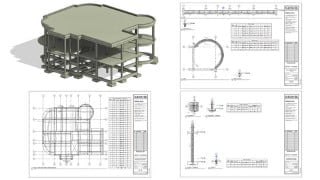

Learn how to create professional reinforcement details shop drawings for concrete buildings using Revit Structure 2022. This comprehensive course covers all aspects of reinforcement details, making it a valuable reference for understanding and preparing high-quality shop drawings. Gain hands-on experience and be ready to start your own projects with Revit. Perfect for structural engineers.
What you’ll learn
- Create a professional reinforcement details shop drawings sheets
- Create reinforcement for all members of the concrete building (foundation, column, beam, slab, and stair)
- Create a bill of quantities (rebar schedules) for all members of the concrete building (foundation, column, beam, slab, and stair)
- Print Reinforcement Details Sheets to PDF
- Export Reinforcement Details Sheets to DWG
Hello, welcome to
Revit Structure 2022: Step-by-Step Complete Shop Drawings (Reinforcement Details) for RC Building from A to Z
Divided into six main chapters, our course covers all aspects of Reinforcement Details, also it will be a very powerful reference for you as it will help you understand how reinforcement details work on the Revit, and you can also refer to it if you use another project to prepare high-quality and beautiful reinforcement details sheets
The use of reinforcement in Revit Structure will be explained through direct application on a simple concrete project, starting from adding reinforcement to the foundation, column, beam, slab, and stair, to produce professional structural shop drawings (Reinforcement Details).
To get the most out of the course, it is preferable to open Revit and start applying step by step with videos.
Finally, at the end of the course, you will be ready to start your own project using Revit and prepare all shop drawings (Reinforcement Details) professionally.
What you will learn in this course?
Edit Override Graphics in View(By Element & By Category)
Surface Patterns & Cut Patterns
Modify tools ( Align, Offset, Mirror – Pick Axis, Mirror – Draw Axis, Array, Rotate Move and Copy)
Join options ( Join Geometry, Unjoin Geometry, Switch Join Order )
Create Callout & Section
Edit Crop Region
Edit View Range
Edit Structural Plan Type (up&Down)
Edit Visibility/ Graphics
Structural Reinforcement Cover
Structural Reinforcement Rebar
Edit Bar Diameter
Rebar shape Browser
Edit Structural Rebar Properties ( Partition, Shape, View Visibility States, Dimensions and Image )
Structural Rebar Mode ( Edit Sketch)
Structural Rebar Set (Layout, Quantity, and Spacing)
Structural Rebar Presentation
Structural Rebar Constraints (Edit Constraints)
Structural Rebar Set Type (Varying Rebar Set)
Import Structural Rebar Image
Autodesk App Store (Instal Add-Ins to Revit )
ElementSelector (Twenty Two)
Annotate Tag (Aligned Multi-Rebar Annotation and Tag by Category)
Annotate Detail (Component Break-Line)
Annotate Dimension
View Create ( Schedules/ Quantities)
Structural Rebar Schedule
Schedule Properties (Fields, Filter, Sorting/Grouping, Formatting, and Appearance )
Fields (Rebar Number, Bar Diameter, Bar Length, Partition, Reinforcement Volume, Add Calculator Parameter and Image).
Filter ( Filter by Partition)
Sorting/Grouping ( Sort by Rebar Number)
View Create Sheet (Load Title Blocks)
Edit Title Blocks
Print (PDF)
Export (DWG)
Who this course is for:
- Structural Engineering
User Reviews
Be the first to review “Revit 2022: Reinforcement Details Shop Drawings from A-Z”
You must be logged in to post a review.





There are no reviews yet.