
Davinci Resolve 18 – A Beginner’s Guide
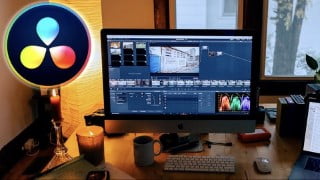

Learn how to edit videos for YouTube and social media using DaVinci Resolve, a free software used in Hollywood. This course covers everything from downloading the software to adding effects, fixing audio, and exporting your final video. Perfect for beginners, this class will give you the confidence to edit any video for online platforms. Start your video editing journey today!
What you’ll learn
- How to download DaVinci Resolve
- How to import, cut and trim raw footage in DaVinci Resolve
- Adding B-roll to your videos
- How to add effects such as: 1)Titles & text, 2) Video transitions, 3) Audio transitions, 4) Music, 5) Sound effects
- Colour correcting your videos
- How to fix your audio
- How to export your final video and save it to your computer
Hey Friends!
If you are a beginner & want to learn how to edit videos for youtube and other social media, keep reading…
This course will go through the entire video editing process, step by step, from start to finish in DaVinci Resolve – A completely free software; used in Hollywood!
What will you learn?
Everything you need to know to edit a video!
How to download DaVinci Resolve
How to import, cut and trim raw footage in DaVinci Resolve
Adding B-roll to your videos
How to add effects such as:
Titles & Text,
Video transitions
Audio transitions
Music
Sound effects
Colour correcting your videos – DaVinci Resolve specialises in this
How to fix your audio
How to export your final video and save it to your computer
Who needs this class? – It’s Absolutely crucial
If you have NEVER edited a video in your life or you have but VERY LITTLE, this is the class for you!
I promise you, if you got through this course attentively, noting down important information & practising everything you have learnt on the class project, by the end of this course, you will be much more confident and be able to edit ANY video for Youtube and other social media. Pinky promise.
So hop on this journey & I’ll see you on the other side
Who this course is for:
- Beginners in video editing who want to use a free & professional software to start their video editing journeys
User Reviews
Be the first to review “Davinci Resolve 18 – A Beginner’s Guide”
You must be logged in to post a review.


There are no reviews yet.