
Intermediate Masterclass in Capture One Pro 22 and 23
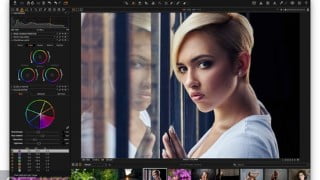

Learn advanced color correction and grading options in Capture One Pro 22. Improve your photography workflow with this powerful digital asset management tool. Perfect for any kind of image editing and processing, it’s the best alternative to Adobe Lightroom. Suitable for beginners to intermediates, this course teaches the right workflow and editing techniques. Taught by a professional photographer with years of experience, you’ll also learn skin retouching and tricks for achieving the best skin color. Ideal for photographers and those interested in photo editing, especially those switching from other software like Adobe Lightroom Classic. Discover the power of Capture One Pro.
What you’ll learn
- Exporting Photos with advanced Options in Capture One Pro 22 as a Bonus
- Advanced Color Grading in Capture One
- Portrait editing and extra Color Grading in Capture One Pro
- Color Correction and fixing over and underexposed pictures in Capture One
- Extra Shortcuts and easier ways of editing pictures in Capture One Pro
Welcome to the Ultimate Intermediate Capture One Pro 22 Course. In this course, you will learn the advanced color correction and color grading options in Capture One Pro 22.
Capture One Pro is a powerful digital asset management (DAM) tool that can benefit any photographer. Whether you’re new to photography or an established photographer, Capture One has professional-level tools that can help you improve your photography workflow.
It is the best alternative to Adobe Lightroom and is perfect for any kind of image editing and processing.
In these lesson, you will get to learn the right workflow of Capture One Pro and how to begin and edit to an intermediate editor. No prior knowledge of the software is required as the lesson is fashioned for anyone from beginner to intermediate.
The Capture One software used in these tutorial is Capture One Pro 22 but any version should be good.
I will teach all the things I have learned in my professional career as a Digital Photographer and Operator, providing digital workflows to some of the leading photographers in the industry and pass on my years of experience working in this highly demanding environment.
You will learn advanced and intermediate level in image editing in Capture one pro. This will include basic of Skin retouch and tricks to achieve the best skin color.
Who this course is for:
- Photographers and people interested to learn Photo editing in Capture One Pro
- People who are switching to Capture One Pro from other softwares like Adobe Lightroom Classic
- People who are curios about the power of Capture One Pro
User Reviews
Be the first to review “Intermediate Masterclass in Capture One Pro 22 and 23”
You must be logged in to post a review.




There are no reviews yet.