
Portrait Retouching – Photoshop tutorial
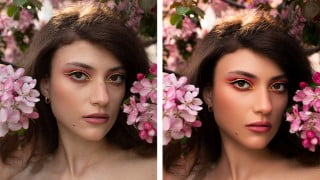

Learn professional photo retouching techniques in this comprehensive Photoshop course. Suitable for beginners and advanced users, you’ll discover how to remove blemishes, use frequency separation, dodge and burn, retouch eyes, and edit in Camera Raw. With over 7 lessons and 2 hours of content, you’ll also receive free premium portrait retouching actions to enhance your workflow. Whether you’re a photographer, photo editor, or retoucher, this course is designed to improve your skills and achieve stunning results. Join Anil Raj, an experienced photographer and retoucher, and start retouching your photos today.
What you’ll learn
- frequency separation
- dodge and burn
- camera raw filter
- adjustments layers
- colour grading
- overall editing
- lighting, how highlights and shadowds can change an image
- Bonus
- A Small Project for all of you.
You are in the right place. I am Anil Raj, Photographer and Photo Retoucher. I have been exploring photoshop for years to finally settle in the retouching area.
this is a 130+ minutes long video + voiceover in English course where I have explained everything in detail and trust me you’ll learn about many new things here, I have provided all the shortcuts as a PDF and I have used completely easy techniques to make your workflow much faster and easier. you’ll get a bonus file in the last which contains a complete in detail video on how to get much more contrast and sharp pictures.
In this course, You will get over 7 lessons and 2 hours of content. What’s best – You will also get free premium portrait retouching actions. And of course, other resources which allow You to speed up Your workflow!
Don’t worry if you are a beginner because we are going to cover the whole process from the very beginning till the final touch-ups. I will show You how to do raw processing using a camera raw. And also, if You are a little bit more advanced user, I believe You can find a lot of new information on processing and retouching Your Images and color grading techniques.
Here you’ll be learning
1. Removing Blemishes
2. Frequency Separation
3. Dodge & Burn
4. Eye Retouching
5. Camera Raw Filter
6. Bonus
and you’ll get free premium portrait retouching actions too.
I have also Added a Premium Portrait Retouching Actions which includes –
1. Frequency Separation
2. Dodge & Burn in a single layer
3. Dodge & Burn curves normal
4. Dodge & Burn one click
5. Eye Shade Enhancement
6. Eye Liner Enhancement
7. Rosy Lips
8. Smokey Lips
9. Rosy Cheek
10. Color Pop
11. to add Shine
12. Final step
and many more photoshop actions to make everything easier for you ( Worth 30$ ) but this is absolutely free of cost, waiting just for you.
Who is this course for?
Beginner Photographers
Intermediate Photographers
Pro Photographers
Photoshop enthusiast
Freelance Photographer
Freelance Photo editor
Photo Retoucher.
Retouch a photo of your choice!
I’ve added the same photo that I’ll be working on into the project folder of this class. You can edit along with me or use a different photo.
You can also find some free RAW photo for practice below:
signatureedits/free-raw-photos
As you complete the class project you’ll go through:
Removing blemishes from your photo
Retouching and smoothening skin using frequency separation
Dodge & Burn ( local and global ), Retouch Eyes
Edit in Camera Raw Filter with the settings of your choice.
Upload a before and after photo of your choice to the Project Gallery section of this class and I’d be happy to give you some feedback.
I can’t wait to see what you come up with!
course image credit – Anna Matulis
Who this course is for:
- Beginner Photographer
- Intermediate Photographer
- Portrait Retoucher
- Portrait Photographer
User Reviews
Be the first to review “Portrait Retouching – Photoshop tutorial”
You must be logged in to post a review.



There are no reviews yet.