
Free Photoshop Retouching Tutorial – Creative Photoshop Portrait Retouching and Lightroom
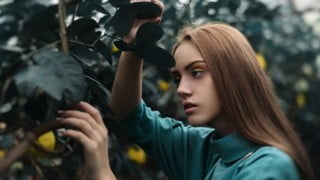

Learn how to retouch portrait photography using Adobe Photoshop for professional results. This step-by-step guide and tutorial covers techniques like dodging and burning, color grading, and more. Perfect for beginners in Photoshop and those looking to enhance their retouching skills. Improve your skin and hair retouching, enhance eyes, and master dodge and burn techniques. Take your photo editing skills to the next level and become a beauty or creative portrait retoucher. Suitable for anyone interested in retouching and achieving stunning results.
Learn how to retouch portrait photography using Adobe Photoshop for professional results in this step-by-step guide and tutorial.
This video tutorial that will show you a full image edit, including retouching, dodging and burning, color grading, and more.
This tutorial will show you the full process of retouching and color grading a portrait in Lightroom and Photoshop, including using
techniques like dodging and burning, frequency separation, selective color, Curves, and more.
In this tutorial, I show all the secrets of my processing. I show how to achieve a fabulous unusual color of greenery and the
environment. I show how to get rid of unnecessary objects in the frame and so on.
Open Photoshop window while watching the videos and apply them step-by-step in your photography.
I will also attach a RAW file with a photo to this lesson, on which you can practice.
What This Course Include?
– Whole process of basic skin retouch so You will be able to retouch the skin and hair.
– Complete Eyes retouch which shows You how to make the eyes bigger, how to retouch them, as well as how to sharpen and brighten them up!
– Complete Dodge & Burn guide which shows You how to do global and local Dodge & Burn in the right way.
– Sharpening Lesson.
– You will learn how to create simple final Adjustments
Who this course is for:
- Beginners in Photoshop and photo editing
- People with interests in Photoshop
- Everyone who wants to take their reatouching skills to the new level
- Everyone who wants to become a Beauty Retoucher
- Everyone who wants to become a Creative Portrait Retoucher
- People with an interest in retouching
User Reviews
Be the first to review “Free Photoshop Retouching Tutorial – Creative Photoshop Portrait Retouching and Lightroom”
You must be logged in to post a review.



There are no reviews yet.