
PCB design using EASYEDA
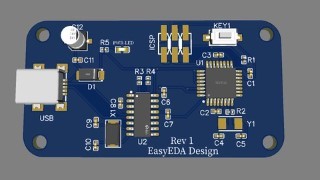

Learn the basics of Printed Circuit Board (PCB) design, including schematic and circuit design, component selection, routing and layout, and generating Gerber files. This 2-hour course is perfect for students, engineers, electronics makers, and professionals interested in university projects. No software download is required as we will use an online PCB editor. Join us to master the entire process of PCB design and start creating your own boards. Suitable for students, teachers, makers, and electronics enthusiasts.
What you’ll learn
- Basics of Printed Circuit Board
- Schematic and circuit design
- Selection of Components
- Routing and layout
- Design rule check
- Generate Gerber files
- How to order the pcb from the gerber files
After completing this course I am pretty much sure that you will be able to design your own printed circuit board. This course is a 2 hour course with instructed lectures and explanation on each topic. This course is designed for students, engineers, electronics makers and professionals or anyone interested in making the university projects. Do not need any software to download as we will use the online PCB editor in this course. We will guide you to the entire process of Printed circuit board design.
The Topic which are covered
1. Introduction to PCB design: Learn what is PCB and the different terminologies used in the PCB. Differentiate between through hole and smd components. Step by step instruction on how to design a PCB. Use the Free EasEDA software in this course. We will also see the EasEDA interface on the webbrowser. You will just need a Webbrowser with and active internet connection.
2. Schematic Design: Convert the circuit design to the Schematic design. Select components and do the connection. Perform electrical rule check after completing the schematic. This is the first step in PCB design and it should be correct to make it work.
3. PCB design and Layout: convert the schematic design to the PCB. Learn how to place the components/footprint according to the schematic design. Route the tracks using the autorouting feature of the EasyEDA tool. Perform design rule check based on the rules defined.
4. Gerber files and BOM: After completing the design, then generate the gerber files or the output files. This gerber files are given to the PCB manufacturer to manufacture this PCB according to the design.
If you have build some circuit on breadboard and want to convert it to a PCB then this you are at the right place. We will teach you how you can convert the circuit design to the schematic design and then convert them to Printed circuit board. Manufacture those PCBs and after that you can physically solder the components and test those PCBs.
Who this course is for:
- Students, teachers, makers and professionals
- Electronics enthusiastic
User Reviews
Be the first to review “PCB design using EASYEDA”
You must be logged in to post a review.





There are no reviews yet.