
Stunning Panoramas: Simplify Your Workflow
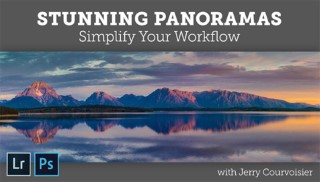

Create, refine and stitch breathtaking panoramas from start to finish! Learn how to capture the right photos in the field and bring them together…
Class Preview
Create, refine and stitch breathtaking panoramas from start to finish! Learn how to capture the right photos in the field and bring them together perfectly.
Capturing the Scene
World-class Photoshop and Lightroom specialist Jerry Courvoisier explains how to pre-visualize in the field so you can capture the perfect images for stunning panoramas. You’ll learn to avoid common mistakes and discover the best ways to plan shots that recreate the scene, with or without a tripod.
Pre-Process Panorama Merge
Overwhelmed by organizing and paring down your panoramic images? Jerry explains how to use Adobe Lightroom’s “Loupe View” to make the process quick and painless. Then, learn to use Lightroom features such as Match Exposure to merge your images with ease.
Image Processing for Photomerge
The right processing can make or break your panoramic images. In this lesson, you’ll learn when and why to use spherical, perspective, and cylindrical options in Lightroom Photomerge. Plus, Jerry shares his expert tips for troubleshooting distortion, lens flare and more.
Post-Process Stitched Images
Once your images are stitched together, it’s time to fine-tune the details to make your panoramas shine. Jerry explains how to experiment with cropping, tonal adjustments, luminance and selective area adjustments to get beautiful results without leaving Lightroom.
HDR in Panoramas
Welcome to the wonderful world of HDR! High dynamic range photography lets you merge multiple exposures to create stunning, realistic photographs. Jerry walks you through his three-stage process so you can capture, merge and enhance your photos like a pro.
Panorama Stitching Variations
Go beyond the basics with Jerry’s expert advice on creating detailed multi-row squares and creative collages. You’ll learn to conquer the tricky overlapping process to expand your images vertically and horizontally, then discover which scenes and images work best in collage.
Processing & Output
To stretch the limits of your panoramic projects, it’s time to dive into Photoshop. You’ll learn to set up Lightroom to directly connect for external editing and learn how to make the two applications work in tandem. Then Jerry teaches you the right way to export and share your images with the world!
User Reviews
Be the first to review “Stunning Panoramas: Simplify Your Workflow”
You must be logged in to post a review.




There are no reviews yet.