
Free Tutorial – Create a Beautiful Stationery Set with Procreate
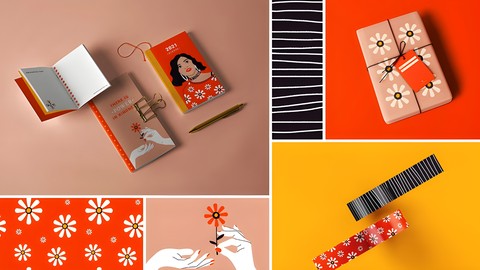

Imagine designing motifs and patterns for your own product line! Join the AllGoodTutorials Team as they guide you through their process and inspirations to create a beautiful and cohesive stationery collection. In this course, the AllGoodTutorials Team will teach you the basics of building your own collection, using the power of design to answer a simple question: What does the world need more of? Design a stationery set inspired by your wish for the future as your creative concept.
You will start by discovering more about stationery design, exploring the team’s inspirations, and learning about their creative approach and work process. You’ll delve into the inspiration phase, create a visual moodboard, and conceptualize your ideas. Then, you’ll learn to work with Procreate to create quick repeat patterns and transition your designs to Adobe Photoshop for final refinement. Finally, you’ll apply your designs to product mockups, creating professional presentations for your portfolio or potential licensing.
What You’ll Learn:
Inspiration and Conceptualization:
Gather and organize inspiration to create a visual moodboard.
Develop a cohesive collection concept inspired by your vision for the future.
Design Techniques in Procreate:
Create intricate and appealing motifs and patterns using Procreate’s tools.
Master the basics of quick repeat patterns in Procreate.
Integration with Adobe Photoshop:
Seamlessly transition your designs from Procreate to Photoshop.
Refine and finalize your designs using Photoshop’s advanced features.
Creating and Using Mockups:
Apply your designs to product mockups to visualize your stationery collection.
Present your work professionally for portfolios and potential licensing opportunities.
Course Outline:
Introduction to Stationery Design:
Overview of the stationery industry and its significance.
Insights into the AllGoodTutorials Team’s inspirations and creative approach.
Inspiration Phase:
Techniques for gathering and organizing inspiration.
Creating a compelling and cohesive visual moodboard.
Pattern Creation in Procreate:
Basics of Procreate for pattern design.
Step-by-step guide to creating quick repeat patterns.
Design Development in Photoshop:
Importing Procreate designs into Photoshop.
Refining patterns and motifs with Photoshop’s tools.
Finalizing Designs with Mockups:
Applying designs to various stationery products using mockups.
Presenting your final collection in a professional manner.
Portfolio and Licensing:
Tips on building a strong portfolio with your stationery collection.
Exploring opportunities for licensing your designs.
Requirements:
Basic knowledge of drawing and illustration.
Familiarity with Procreate and Adobe Photoshop.
An iPad with Procreate installed.
A computer with Adobe Photoshop installed.
By the end of this course, you’ll have a beautifully designed stationery set that reflects your creative vision and can be proudly showcased in your portfolio or even licensed for production.
Who this course is for:
- Individuals who are looking to expand their skills in creating cohesive collections and want to add a beautifully designed stationery set to their portfolio.
- Professionals seeking to refine their techniques in Procreate and Photoshop and learn new methods for creating patterns and motifs.
- Hobbyists and stationery lovers who enjoy creating their own designs and wish to learn how to develop a complete collection.
- Anyone passionate about stationery and looking to bring their creative concepts to life in a structured and professional manner.
- Freelancers aiming to diversify their offerings to clients by learning how to design unique stationery sets.
- Entrepreneurs interested in creating their own product lines, understanding the process from conceptualization to final product mockups.
- Students who have a basic understanding of drawing, illustration, and the use of Procreate and Photoshop, and want to learn how to apply these skills to stationery design.
- Those who are looking to build a strong portfolio piece that demonstrates their ability to create a cohesive and market-ready product collection.
User Reviews
Be the first to review “Free Tutorial – Create a Beautiful Stationery Set with Procreate”
You must be logged in to post a review.





There are no reviews yet.