
Sailing Boat Tutorial ( Modeling, Texturing, Lighting)
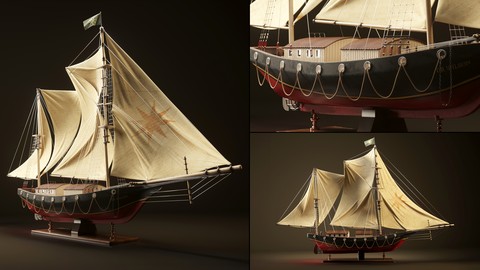

What you’ll learn
- Master Basic to Advanced Modeling Techniques: Learn to model a detailed sailing ship using 3Ds Max, Marvelous Designer, and TyFlow for realistic simulations.
- Efficient UV Mapping and Texturing: Master UV mapping in Rizom Lab and texturing in Substance Painter for creating high-quality textures and materials.
- Create Realistic Materials: Develop skills in creating and applying realistic materials using Substance Painter and integrating them into 3Ds Max.
- Professional Rendering: Gain proficiency in setting up lighting and rendering scenes using both Vray and Corona, achieving high-quality final renders.
Hi, you are very welcome to the training course on building a sailing ship. In this course, we have 3 general sections. Modeling, Unwrap and Texturing, and material and lighting in 2 popular rendering engines of 3Ds Max.
In 4 hours and 18 min, I tried to use the simplest possible methods so that I can make the learning process easier for you. I hope this tutorial is useful for you.
Length: 4 hours and 18 minutes
12 video Parts
Full narrated
Software: 3Ds max, Rizom Lab (unfold3d), Substance painter, Vray, Corona, Ty Flow
First Chapter
In the first chapter, we Start with review our references, prepare our references, and setup 3Ds Max and ready to start modeling with simple and principled techniques. After base-mesh is finished, we start to add the details. For things like sails, we use the wonderful Marvelous Designer, which has done a great job for us in the Cloth simulation. For the body’s rope simulation sections, we also use ty flow to give a more natural look to the whole work. Now, we complete modeling phase and it’s to move next step.
Second Chapter
In the second chapter, we use the Rizom Lab (unfold3d) to prepare and UV our models for texturing phase in Substance Pinter. After that, we prepare our file to go to Substance painter and start texturing phase for this model. After the texturing steps, it is time to transfer our textures to 3Ds Max to create materials in the third chapter, and render the model.
Third Chapter
In the third chapter, we have 2 separate sections for each rendering engine. In both Vray and Corona rendering engines, we will examine all the steps of Creating materials that will be very easy with the Substance Pinter, and then we will have the lighting and the final rendering separately for each of them.
At the end of this tutorial, you will have a good understanding of the modeling process, how to use software such as Marvelous Designer in our modeling phase, the process of texturing in Substance painter and shadering in both Corona and Vray rendering engines.
Prerequisites
For this tutorial, you need to be familiar with the basics of 3Ds Max, Marvelous Designer, Substance Painter, Rizom Lab, and Corona or Vray at a basic level and how to navigate.
Who is this training suitable for?
This training will be useful and practical for all those who meet the above condition.
Who this course is for:
- Beginners and intermediates in 3D modeling, automotive design, and VFX with basic knowledge of 3Ds Max, Marvelous Designer, Substance Painter, Rizom Lab, and Vray/Corona.
User Reviews
Be the first to review “Sailing Boat Tutorial ( Modeling, Texturing, Lighting)”
You must be logged in to post a review.



There are no reviews yet.