
Arduino Robotics with the mBot
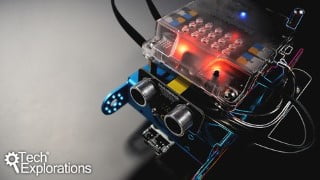

Learn how to program the mBot, an Arduino-based educational robotics platform, using Scratch. This course is perfect for school students, teachers, electronics hobbyists, and parents looking for fun educational activities. Discover how to assemble the mBot, explore additional hardware options, and program it on your tablet or computer. The main project involves teaching the mBot to follow a black line on the floor, combining sensors and actuators efficiently. Get started with this friendly and extensible robot and unleash your creativity in building your own robotic creations.
What you’ll learn
- Program the mBot on the tablet device
- Program the mBot on the PC
- Use the mBot sensors and actuators
- Program the mBot using the Scratch language
- Come up with your own fun experiments for the mBot
This course will introduce you to the mBot, the world’s friendliest educational robotics platform. The mBot is an Arduino-based, two-wheel robot that comes with build-in sensors and actuators, and that you can program using Scratch, a graphical programming language.
The mBot is also extensible, with a lot of components available that you can use to build your own robotic creations.
In this course, I will show you how to assemble the mBot, discuss the additional hardware options, and demonstrate how to program it on your tablet and your Windows or Mac OS computer.
The main project of the course involves programming the mBot to follow an arbitrary black line on the floor. In this project we must combine our robot’s sensors and actuators efficiently to enable it to stay on the line while it travels on it as quickly as possible.
At first glance, you may think that getting a robot to follow a line is easy. That’s not true for a robot.
As the programmer, you must “teach the robot” to do something that to a human is intuitive. You need to extract the intuitive understanding of how to follow a line and convert it into code.
The required hardware is the mBot itself, and a computer (Windows or Mac OS). You can purchase an mBot direct from its manufacturer, Makeblock, or from your local reseller. You can download the software from free from the Makeblock website.
Who this course is for:
- School students and homeschoolers interested in robotics projects
- Teachers, interested to learn skills for a STEM class
- Electronics hobbyists looking for a gentle introduction to robotics
- Parents looking for a fun educational activities to take with their children
User Reviews
Be the first to review “Arduino Robotics with the mBot”
You must be logged in to post a review.



There are no reviews yet.