
Building Websites with Photoshop CC
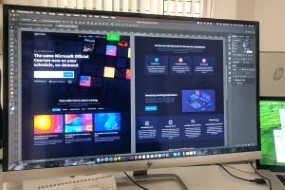

Learn how to build upon a wireframe to design a functional web page and how to extract the HTML and CSS that will bring your design to life in this free course.
If you have ever wanted to design beautiful, functional websites, then this free online web design course will set you on the right path. Photoshop CC is the perfect platform to use because of its extensive tools and functionalities. Learn about the various grid systems that can be used as templates to build professional looking web pages, wireframing and UI design and importantly, how to extract HTML and CSS from Photoshop.
What You Will Learn In This Free Course
Introduction
This module will introduce you to the course’s content. You will comprehend the course’s workflow and the various topics that will be covered. Various techniques and markup languages for designing the website will also be outlined. You will also learn how to set up and save various Photoshop customizations for web layout design.
Structuring Layouts with Photoshop
This module will teach you how to structure an overall layout for designing a website. You will discover how grid systems and guides are used to position various objects in the layout. Various wireframing and colour-coding techniques for groups of objects will also be demonstrated.
Applying Design To The Wireframe
In this module, you will add design to all wireframe objects created in the previous module. You will learn how to gather design resources efficiently and how to use layer styles to add effects to layout objects. Linked smart objects, the use of layer masks to position content, and designing with clipping groups will also be demonstrated.
Getting The Layout Out Of Photoshop And Into Code
In this module, you will learn how to extract Html and CSS code from Photoshop. You will learn how Photoshop’s asset generator aids in the real-time generation of assets, as well as how to use the slice tool. The steps involved in setting up an external style sheet to be used with the layout will also be outlined.
Rebuilding The Layout With Code
This module will teach you how to rebuild the website layout using the extracted code. You will also learn some new HTML and CSS commands, as well as how to link Html and CSS for an object. A detailed explanation of how to code each section of the layout will be provided.
Course assessment
User Reviews
Be the first to review “Building Websites with Photoshop CC”
You must be logged in to post a review.




There are no reviews yet.