
Create Realistic Elevations with Vray for Sketchup | Archviz
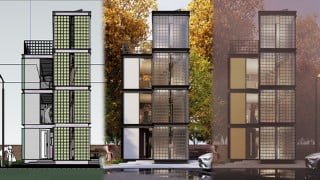

Learn to create photorealistic architectural elevations and materials with Vray 5 for Sketchup. Perfect for architects, CG artists, and enthusiasts.
What you’ll learn
- Learn to create Photorealistic Elevations of your Home
- Learn to create various photorealistic Architectural Materials from scratch
- Learn to create a wet effect for roads and more
- Learn to use Skatter 2 to scatter various objects in the Scene
Learn how to create Photorealistic Architectural Elevations/Facades with Vray 5 for Sketchup. You will learn to create a photorealistic Elevation Render in under 2 Hours.
WHY THIS COURSE?
Exercise Files – Exercise files like Sketchup Models for every lesson so you can follow along step by step.
Downloadable Resources – Get free access to our Material Library & Scenes for further practice.
Q&A Support and Access to me – I will answer all your queries & questions on the Q&A forum on Udemy and help you in your journey. What more could you ask for!
WHO IS THIS COURSE FOR?
CG Artists
3D Artists
Archviz Enthusiasts
Interior Designers
Architects
Hobbyists
Set Designers
Furniture Designers
CAD Draftsmen/women
Anyone with an interest in the field of Architectural Design
Students of Architecture/Interior Design
(note that this course will be taught on the windows version but the same techniques can be applied on Mac as well)
WHAT YOU WILL LEARN?
Here are the contents of this class:
Setting up the model the right way
Setting up the Camera & Lighting
Using Trees to alter lighting in Scene
Create various Architectural Materials such as
Glass Blocks
Iron
Wet Roads
More
Adding Reflections to Glass Materials
Quick & Fast Lighting Tips
Adding Grass using Skatter 2
Using Aerial Perspective & Environmental Fog
Post Production Techniques in Vray Frame Buffer
Special Features Provided
Downloadable Scenes, complete with all V-Ray Settings
By the end of this course, you will be able to create professional-looking Elevation Renders directly within Sketchup using Vray 5 and more useful plugins.
Who this course is for:
- 3D Artists
- Architects
- CG Artists
- Archviz Enthusiasts
User Reviews
Be the first to review “Create Realistic Elevations with Vray for Sketchup | Archviz”
You must be logged in to post a review.



There are no reviews yet.