
Create your first Unity 3D game – Farmer Collector
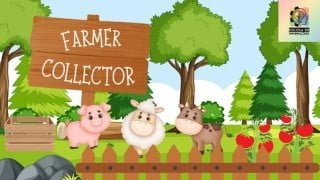

Learn how to create a 3D game in Unity with this comprehensive course. No coding skills required as scripts are provided. Build your own game and acquire the skills to turn your ideas into reality. Perfect for beginners and those interested in game development.
What you’ll learn
- Create a basic 3D game using provided scripts, the asset store and modify inspector properties
- Understand how a game can be structured, covering UI, first person controller and a scenario with score and interactables
- Create and assemble a 3D scene using assets from the store and the Unity terrain system
- Understand the basics of a 3D game and what other actions can be taken to take it one step further to create a full game to be published
- Be better equipped to create your own Unity 3D games by understanding the knowledge and steps required as part of the creation process.
In this course we are going to create a First Person game, called “Farmer Collector”, where you play as a farmer, who needs to collect as many tomatoes as possible in a box under the available time to score points.
We will create the complete game from scratch, giving you the chance to learn about the entire creation process, which includes:
Creating the main scene
Configuring the First Person controller
Configuring the terrain
Configuring the environment
Creating the game logic for the timer, throwing tomatoes and getting scores
Configuring the UI
Configuring the game sounds and sound effects
Adding props
Adding animals and configuring AI navigation
Configuring Skyboxes
Building the game
In addition, no coding skills are required, as all scripts will be provided as part of the course content, but you are free to explore and leverage these scripts in your own projects. The 6 provided scripts include:
Game Manager
Object Interact
Object Interactable
Score Collider
Sound Manager
Animal Wander
Also we will provide you with a stunning UI canvas with a custom font that can be used to greatly improve the look of your game!
In addition, we’ll also leverage Unity Asset Store to make our game look great using a custom store list link I have prepared for you.
By the end of this course you should have your own Unity 3D game “Farmer Collector” ready to play and acquired the skills and knowledge to turn your next game ideas into reality.
Thank you and enjoy your learning time!
Marcos
Who this course is for:
- Anyone interested in creating games
- Beginners in game development
- Creators that are willing to start exploring 3D game development
- People interested in learning Unity
User Reviews
Be the first to review “Create your first Unity 3D game – Farmer Collector”
You must be logged in to post a review.



There are no reviews yet.