
Free Audio Production Tutorial – Making music 3 Akai’s MPC Studio MK2: Stories for children
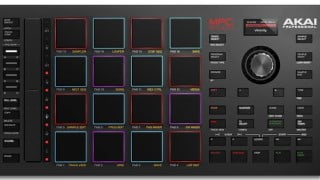

Learn how to use your MPC Studio MK2 controller to create audio stories for children. Record, add sound effects and background music, and export to mp3. Increase the love for reading and music. Perfect for anyone interested in using MPC Software.
Making Music 3
The intention of this course is to enable you to learn how to use your mk2 controller to easily record a story for a child and insert a sound effect to indicate that it is time to turn the page as well as add in background music for the child to enjoy the story repetitively. You will learn how to export the file to mp3 and then upload it to bandcamp so that wherever you are you can play the story from your bandcamp account also you will learn how to put the file on your streamdeck so that with a push of a button you or your child can find the picture of the book and push it and it will activate the story. You will also learn how to use your mk2 controller to do things like record, stop, navigate the playhead to the start, load and browse samples, and quickly change modes like going to the sample edit screen,track view, main view and also sample editing to change the length of the sample as well and changing the volume of the sample as well. The hope is that by doing this course we can increase the love of both reading and music!
Who this course is for:
- For anyone who is interested in using MPC Software and their MPC Studio MK2 controller to create audio stories for children to listen to
User Reviews
Be the first to review “Free Audio Production Tutorial – Making music 3 Akai’s MPC Studio MK2: Stories for children”
You must be logged in to post a review.



There are no reviews yet.