
Free Game Asset Creation Tutorial – Make Stylized Tree by using Blender and Unity
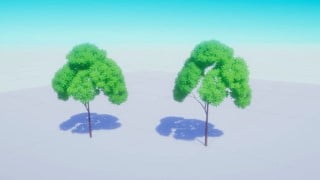

This one hour long course is perfect for new beginners in Blender and Unity. Learn tricks and shortcuts for using Blender and Unity, including creating tree trunks, making tree leaf textures, and using sculpt tools and particle systems. Discover how to make stylized tree shaders in Unity and animate tree leaves in wind using Unity URP shader graph. The course includes software instructions for Blender 2.83, Unity 2019.4, and Photoshop 2019. Ideal for beginner Blender, Unity, and game developers.
This one hour long course is made for Blender & Unity new beginners. I will show you some tricks when using Blender and Unity, all my actions and short keys will show you in the video! Don’t worry even though you are new beginners!
Course contents:
Create tree trunk by using blender plugin
Make tree leaf texture in Photoshop
Use sculpt tool and particle system in blender to make tree leaves meshes
Make Stylized tree shader in Unity
Modify tree leaves’ normal to smooth leaves shadow
By using Unity URP shader graph to make tree leaves animation in wind
Softwares:
Blender 2.83
Unity 2019.4
Photoshop2019
Software instructions:
Unity is a cross-platform game engine developed by Unity Technologies, first announced and released in June 2005 at Apple Inc.’s Worldwide Developers Conference as a Mac OS X-exclusive game engine. The engine has since been gradually extended to support a variety of desktop, mobile, console and virtual reality platforms. It is particularly popular for iOS and Android mobile game development and used for games such as Pokémon Go, Monument Valley, Call of Duty: Mobile, Beat Saber and Cuphead. It is considered easy to use for beginner developers and is popular for indie game development.
Blender is a free and open-source 3D computer graphics software toolset used for creating animated films, visual effects, art, 3D printed models, motion graphics, interactive 3D applications, virtual reality, and computer games. Blender’s features include 3D modeling, UV unwrapping, texturing, raster graphics editing, rigging and skinning, fluid and smoke simulation, particle simulation, soft body simulation, sculpting, animating, match moving, rendering, motion graphics, video editing, and compositing.
Who this course is for:
- Beginner Blender developers
- Beginner Unity developers
- Beginner Game developers
User Reviews
Be the first to review “Free Game Asset Creation Tutorial – Make Stylized Tree by using Blender and Unity”
You must be logged in to post a review.



There are no reviews yet.