
Getting started with Arduino IoT cloud
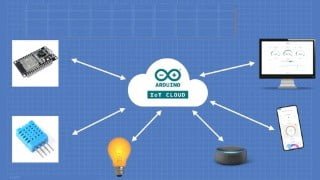

Learn how to build real-time IoT projects that connect to the cloud using the Arduino IoT Cloud Platform. This practical course focuses on hands-on projects, teaching you how to configure the platform, set up microcontrollers, and use ESP32/Esp8266 with Arduino IoT Cloud. You’ll also learn to build dashboards, integrate webhooks, and use If This Then That (IFTTT) to enhance your IoT applications. With projects like home automation, smart plant monitoring, and noise pollution monitoring, this course is perfect for students, hobbyists, engineers, and teachers interested in IoT.
What you’ll learn
- Build real time working IoT Projects that connect to the Cloud
- Learn how to use the Arduino IoT Cloud Platform from the scratch
- Learn how to use the third party board with Arduino IoT cloud
- Learn to build the dashboard from the basics
- Use If This Then That (IFTTT) to integrate Webhooks into your IoT Applications
- learn to create thing in Arduino IoT cloud.
Description
In this course you will learn about the NEW Arduino IoT Cloud Platform .
this course specially focus more on practical projects not on theory .
so i have designed this course in such way that we can learn IoT more easily when directly work on projects only.
Here in this course i have tried make maximum IoT projects .
What you will Learn
In this course, you will learn:
A basic understanding of what is the Internet of Things
What is the Arduino IoT Cloud Platform how to configure the IoT platform
How to setup your third party microcontrollers with Arduino IoT cloud
How to use the ESP32 /Esp8266 with Arduino IoT Cloud.
Learn to build dashboards to monitor your Internet of Things (IoT) projects , peripherals and sensors
Learn to integrate Webhooks in your Internet of Things (IoT) Applications
How to use the If This Then That (IFTTT) to integrate services into your IoT Applications
Learn how to use Arduino IoT cloud web editor.
Learn how to make real time IoT Projects using ESP32 and different sensors.
Learn how to interface different sensor with ESP32 and ESP8266.
What projects you will build
We will start with basics by building simple Internet of Things (IoT) Cloud projects such as:
Home Automation project where we will control the electrical appliances using Arduino IoT app
Getting started with Arduino IoT cloud | Arduino IoT cloud with Esp32
Taking Analog sensor Readings
Detecting events from IoT devices like a button push in the Cloud.
Soil moisture sensor with Arduino IoT cloud | IOT Smart Plant Monitoring System.
Sending sensor data to google sheet using Arduino IoT cloud | log sensor data in cloud.
How to send sensor data from Arduino IoT cloud to Email | webhook & IFTTT with Arduino IoT cloud.
DS18B20 Temperature sensor with Arduino IoT Cloud | DS18B20 with Esp32 & Arduino IoT Cloud.
IoT based Noise pollution monitoring using Arduino IoT cloud @Arduino | Sound sensor with ESP32
You will also learn how to build Internet of Things (IoT) dashboards with little to no code to monitor your Things and Properties from the Cloud!
Who this course is for:
- Students
- Internet of Things (IoT) Hobbyists
- Electronics Hobbyists
- Electrical Engineers
- Makers
- STEM teachers
User Reviews
Be the first to review “Getting started with Arduino IoT cloud”
You must be logged in to post a review.



There are no reviews yet.