
Learn Wincc HMI and Tia portal Complete course from scratch
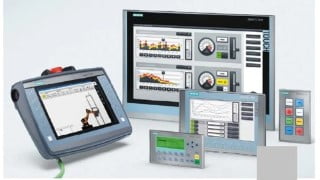

Learn how to design panels and comfort panels on the TIA portal and WinCC professional with Siemens HMI. This course covers alarm creation, user management, pop-ups, and automatic view and cursor management. Perfect for beginner or intermediate automation technicians, engineers, and industrial maintenance technicians.
What you’ll learn
- User control and management
- In this course you will learn from A to Z how to design a panel on the TIA portal (with the panel, comfort panel, RT advanced displays),
- Creation of alarms
- Connection and disconnection logging,
- Creation of events
- Managing views and creating pop-ups
- Scheduling of periodic, acyclical tasks….
- Automatic cursor handling for barcodes
- Automatic management of views via PLC
- Vbscript
SIMATIC WinCC is a supervisory control and data acquisition and human-machine interface system from Siemens. SCADA systems are used to monitor and control physical processes involved in industry and infrastructure on a large scale and over long.See how to create Siemens HMI project and add in a Siemens Comfort Panel and PC Runtime Advanced Application to the project. This is done in the Siemens WinCC Comfort/Advanced software. In this course you will learn the design of panels and comfort panels from Tia portal V14 and WinCC professional. At the end of the training you will be able to create alarms, alarm events, user management, creation of pop-ups or contextual views, automatic management of views and cursors. You will be able to create an hmi on tia portal and you will be able to create alarms, alarm events, user management, creation of pop-ups or contextual views, automatic management of views and cursors. Siemens KTP 400, how to add date/time, text, objects, and I/O field configuration on HMI screen, In this video, you will learn how to add basic elements for HMI screen designing and learn about symbolic/graphical IO filed, Date / Time fields, Bar graph, element objects. In the end, will complete the previous screen designing project.
Who this course is for:
- Beginner or intermediate automation technician
- beginner or intermediate automation engineer
- beginner or intermediate industrial maintenance technician
User Reviews
Be the first to review “Learn Wincc HMI and Tia portal Complete course from scratch”
You must be logged in to post a review.



There are no reviews yet.