
Make Planner Stickers in Silhouette + Cricut
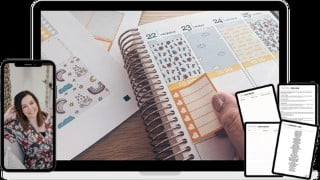

Learn about the importance of UX design and its fundamental principles in this practical course. Perfect for beginners, developers, and designers.
What you’ll learn
- Sticker-Making Tools + Equipment
- Learn to Make Boxes, Header, Checklist + Icon Stickers
- Planner Sticker Design in Silhouette Studio
- Planner Sticker Design in Cricut Design Space
- Printing + Cutting Stickers
Want the step-by-step guide to make planner stickers so that you can start a creative hobby you love?
If you’ve had enough of searching online for the answers on how to make stickers … and getting frustrated with the software and tools … I’m here to help!
Maybe you’ve asked in Facebook groups … but the answers aren’t forthcoming?
Or perhaps you’ve seen others selling stickers on Etsy – and you want to make your own too!
Is your cutting machine gathering dust on the shelf … or do you sometimes want to throw it out of the window?
Getting frustrated with out-of-date Silhouette tutorials or Cricut tutorial videos online?
It’s time to stop feeling frustrated that you haven’t mastered the design software or your cutting machine and start getting excited about making your own made-to-measure stickers that make your life easier.
It’s time to:
Stop wasting money on stickers you don’t need
Get creative and design planner stickers that look beautiful…every week
Always have hundreds of stickers to choose from and put the fun back into using your planner!
Learn how to make Silhouette stickers or Cricut stickers the fast and easy way!
And with your new skills, maybe you could even sell your stickers too.
HERE’S THE SOLUTION:
In this starter course for brand new sticker makers, you’ll learn how to design, print and cut three of the most popular planner stickers!
Design your stickers in Silhouette Studio or Cricut Design Space – even if you’ve never used the software before.
Learn to make Headers, Boxes, Checklists + Icon Stickers to decorate and organize your planner.
You’ll soon be designing stickers like a pro and using the skills you learn to make even more beautiful, made-to-measure stickers!
Who this course is for:
- Crafters, Planners, Scrapbookers and more!
- Silhouette or Cricut cutting machine owners (not essential)
User Reviews
Be the first to review “Make Planner Stickers in Silhouette + Cricut”
You must be logged in to post a review.




There are no reviews yet.