
Making a T-Shirt Quilt
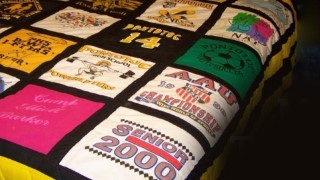

In this class you will learn how to create your own t-shirt quilt from start to finish. Kelly Hanson will show you how to interface and prepare your t-shirts, how to cut them, how to arrange them and…
Class Preview
In this class you will learn how to create your own t-shirt quilt from start to finish. Kelly Hanson will show you how to interface and prepare your t-shirts, how to cut them, how to arrange them and also how to add sashing strips. You will first learn what type of interfacing you should use to stabilize your t-shirts and why. Kelly explains how the product she uses adds structure to the t-shirts but won’t rip or tear if the t-shirt gets stretched during the piecing or quilting process. She will then teach you how to cut your t-shirts. She will explain the common sizes of blocks that are cut depending on the size of t-shirt you are starting with, but also how to work around the t-shirt design, neck edge and arm holes. Kelly also shows you how to use up any small leftover t-shirt pieces or the backs of t-shirts to make accent blocks that can be added to your quilt design. Once your stabilized t-shirts have been cut into blocks you will learn how to sort them to begin arranging them into your quilt design. Get tips for how to lay the block out in ways to add the most visual interest. This includes how to space out colors and group similar designs. Kelly will also show you how to use inkjet fabric sheets as a way to add photos and other personal touches to your quilt. Finally, learn how to finish off the quilt design with sashing strips and other accent blocks.
Session 1: Introduction & T-Shirt Preparation
In this session you will learn about all of the tools you will need to create your t-shirt quilt. This includes your basics, like a rotary cutter and rulers and also other supplies like interfacing for your t-shirts. You will then learn how to prepare your t-shirts to be incorporated into the quilt.
Session 2: Cutting & Sorting Your Blocks
In this session you will learn how to cut your t-shirts into blocks and how to decide what size they should be. You will also see why you should save small leftover pieces of the t-shirts in other sections of the quilt and how to sort all of your blocks once they are cut out.
Session 3: Utilizing Your T-Shirt Fabric
In this session you will learn how to use any leftover pieces of t-shirts as well as the back of the t-shirts. See how to turn them into nine patches, half square triangles and other fun blocks that you can use as accent pieces to the t-shirt fronts.
Session 4: Personalizing with Inkjet Fabric Sheets
In this session you will learn how to use inkjet fabric sheets to add photos to your t-shirt quilt. See how to prepare the fabric sheets, print the photo and get it ready to use. You can use these sheets to create an entire block or as a way to add a fun face to a certain t-shirt design.
Session 5: Designing Your T-Shirt Quilt
In this session you will learn how to design your t-shirt quilt, including how to arrange the blocks in ways that they create the most interest. This includes tips on how to group and space out colors, photos and similar t-shirts.
Session 6: Bringing Your Rows Together with Sashing
In this session you will learn how and when to add sashing strips to your t-shirt quilts. See how they can be used to separate blocks so that they don’t blend together and also how to use them to accent certain t-shirt designs.
Meet Your Instructor
Learn more about your instructor, Kelly Hanson.
User Reviews
Be the first to review “Making a T-Shirt Quilt”
You must be logged in to post a review.



There are no reviews yet.