
Maya Tutorial : Create a Robots Character
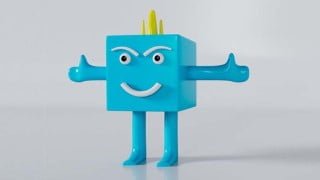

Learn the fundamentals of 3D modeling, UV editing, and rendering with Autodesk Maya 2022. Perfect for beginners and intermediate users in media, film, and gaming. Sign up now and become a better user of Maya!
What you’ll learn
- learn about Understand the fundamentals of 3d modeling
- learn about Model robots
- learn about UV Editing, Material, Setup light and HDR with Arnold
- learn about Render setup with Arnold and more …
Hi, all welcome to my new class Autodesk Maya 2022.
In this class, I will show you Autodesk Maya 2022 step by step and you can easily follow how to model light material, UV editor, and Render with robotic characters. We are designed to help beginners with intermediate 3D modeling and Rendering with confidence.
First, We will learn how to use the Mesh Tool, Edit Mesh, Mesh tools, Deform…. All these tools for creating the Robot’s body, his mouth and eyes, then arms, hair, legs. and I will go through the basics of the program step by step in a very detailed videos Tutorial.
Next, you will learn UV Editing and how to set up the light in Maya. You will learn how to use the HDRI map in Skydome light and Create Camera, which is a high-resolution texture map that acts as a light source. As wall as I will e able to help you basic to advance modeling and rendering with Arnold.
At the last, all students can be Model Render or design their own 3D objects and you can create beautifully rendered images with Arnold Render.
PLEASE, SIGNUP NOW,
And become better use of yourself in Autodesk Maya.
In this Course outline, we are divided into three Sections step by step including:
Section 1: Model, it has 6 Video Tutorial
You can see when using tools in this Section it has Mesh Tool, Edit Mesh, Mesh tools, Deform, and more and I show you step by step in every detail how to model Body face Arm leg, and Hair …
Section 2: UV Editing, it has 2 Video Tutorial
You can see when using tools in this Section it has Uv Toolkit ( Cut Saw Unfold and layout and Transfer Attribute )…
Section 3: Material light and Rendering with Arnold, it has 4 Video Tutorial
You can see when using tools in this Section it has Rename Mesh and I use Project Window and Set Project or I use Skydome light for add HDRI and Use Material AiStandardSurface and Create Camera and Render Setting Image Size 700×900 with Arnold.
The last I hope you learned something about this video but you don’t understand you can comment below Video and welcome your Question.
Who this course is for:
- 3D Model Visualization
- Working in Media or Film and game
- Student in Media or Film and game
User Reviews
Be the first to review “Maya Tutorial : Create a Robots Character”
You must be logged in to post a review.



There are no reviews yet.