
Painting a Realistic Watercolor Portrait in Procreate
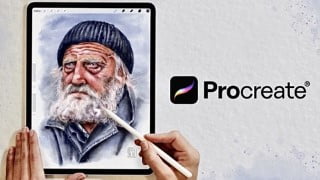

Learn how to paint a realistic watercolor portrait in Procreate with this step-by-step course. From choosing a reference image to creating the perfect color palette, Lettie, an experienced illustrator, will guide you through the process. Suitable for all levels of Procreate users, this course is perfect for aspiring artists and illustrators interested in creating digital watercolor portraits. Start capturing the likeness and character of your subjects today!
What you’ll learn
- To choose a good reference image.
- To sketch a realistic portrait from a photograph using the Loomis method.
- How to make a value study.
- How to create the perfect color palette.
- To paint a realistic watercolor portrait using layers.
- To paint aged skin, eyes, hair, fabric folds…
Painting a realistic portrait is much more than creating a well proportioned sketch and using a beautiful color palette. Our goal is to capture the likeness and character of a subject.
My name is Lettie, I studied Architecture and I’ve been an illustrator since 2012.
I’ve worked on a wide range of projects from architectural designs to video games, to children’s books, websites, I sell my illustrations on print-on-demand sites and, currently, I am combining my illustrator work with teaching digital art… I think it’s worth the effort to take on new challenges and keep evolving. And today, is a good day for a new challenge! Yes, today we are going to paint a realistic watercolor portrait in Procreate. I know it can be intimidating, but I will walk you through all my process.
In this step-by-step course, we will start learning how to choose a good reference image. We’ll talk about the importance of lighting and contrast.
Afterwards, we will use the Loomis method to simplify the head into basic forms. We will learn how to make a value study in a traditional and in a digital way, understand the properties of color and several methods to create the perfect color palette.
Next, we will talk about digital watercolors. Since the techniques and process will be the same than with real watercolors, you will be able to do this digitally or traditionally. The choice is yours!
Finally, we will start painting our portrait. I’ll share with you tips on how to paint skin, eyes, hair, fabric folds, texture, and much more.
The reference image, custom brushes, color palettes, procreate file… everything you need to start painting your portrait with me is included in this course.
Basic knowledge of Procreate is recommended but not required to take this class. Having said that, let’s get started!
Who this course is for:
- Aspiring artist and illustrators
- All levels Procreate users
- People interested in creating digital watercolor portraits
User Reviews
Be the first to review “Painting a Realistic Watercolor Portrait in Procreate”
You must be logged in to post a review.




There are no reviews yet.