
Post-Production Architecture Elevation Course in Photoshop
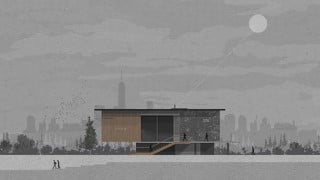

Learn the general workflow of post-production and how to use Adobe Photoshop for architectural visualization. Improve render quality and gain useful tips and tricks. Perfect for architects, students, and graphic designers looking to enhance their graphic skills and communicate ideas effectively.
What you’ll learn
- General workflow of post-production.
- How to use Adobe Photoshop to achieve a good presentation result.
- How to use masks and adjustment layers to achieve the best result
- Improve render details & quality.
- And many useful tips & tricks in Adobe Photoshop.
Generally, you will learn the workflow of different post-processing types for architectural visualization. This course is specially designed for architects and architecture students that are beginners in creating architectural drawings with software like Photoshop. The course is also focused on creators that are interested in improving their graphic skills and taking them to the next level in order to communicate their ideas better.
Also, you will learn:
General workflow of post-production.
How to use Adobe Photoshop to achieve a good presentation result.
How to use masks and adjustment layers to achieve the best result
Improve render details & quality.
And many useful tips & tricks in Adobe Photoshop.
What are the Requirements?
A Computer & Adobe Photoshop.
Any software to produce a 2D or 3D image.
Basic Knowledge of architecture and adobe photoshop.
This Course Includes
11 lessons
70 additional resources (7 files)
Online and at your own pace
Audio: English
Subtitles: English
Level: Beginner & Intermediate
Unlimited access forever
Free Bonus Materials
Frequently Asked Questions
Can I complete it at my own pace? Do I get lifetime access?
That’s the goal! The course is formatted in video lessons as step-by-step tutorials so that you can follow along on your own time. Re-watch as many times as needed and fit in your work/study schedule.
Is there a payment plan?
Yes! You can purchase the course with monthly payments.
Can I take the course using other 3D software?
Yes! The course is focused on Photoshop. We use any 3D software to export your view. But that can be achieved in any other program. It’s simple steps that can be adapted.
Do I need a powerful computer/laptop to take the course?
If you have already created architectural drawings/images for university or client projects, you’ll be able to handle the coursework with no problem! We provide all the base images for download, so you can still follow the lessons without having to create the base files yourself.
Are there any subtitles for this course?
Yes, the course has English, Spanish, Portuguese, Hindi, and Persian subtitles. If you need other subtitles, you can request them.
What if I don’t have the latest versions of the required software?
Not a problem. The majority of the work we’re going to do is achievable with any version from the last 5 years.
Who this course is for:
- Architecture students (School & University).
- Who looking for get job with architectural visualization post-production.
- Graphic designers, Graphic generalists.
- Improve final renders or don’t have strong equipment to add everything in 3D software.
User Reviews
Be the first to review “Post-Production Architecture Elevation Course in Photoshop”
You must be logged in to post a review.



There are no reviews yet.