
Procreate Art Journal Family Spread with 2 Color Washi Tape

Prepare for the Autodesk Certification Professional Civil 3D for Infrastructure Design Professional exam with this comprehensive course. Gain the knowledge and skills needed to excel in the field of civil engineering and impress employers and clients. Perfect for project managers, MEP engineers, architects, and construction professionals.
What you’ll learn
- Step-by-step method for adjusting the Washi Tape brushes.
- Tips for creating compositions for an interesting finished layout.
- Workflow for use of layers and other great features like clipping masks.
- Using the supplied brushes to create photo holders.
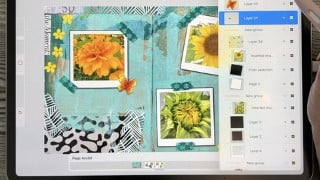
This class is the second in the series of creating multi-page art journals in Procreate. The first class, Multi Page Art Journal in Procreate, explored the use of Page Assist to create a multi-page journal. Now you can set a background which stands alone but appears on each page of your spread. This creates opportunities for creating projects like sketchbooks and art-journals. And why not a family scrapbook? In this class, Art Journal Family Spread with 2 Color Washi Tape, I will show you an art journal spread I create specifically for this purpose. The most exciting thing I create was a two-color Washi Tape, which took me a long time to fully develop. It is an exciting innovation that allows you to use the primary and secondary color swatches to set the colors for the tape.
We will use the washi tape in class to hold our family photos into place. The photos themselves are placed as a clipping mask to interact with a Polaroid Photo stamp brush included in the free brush set. Once all these little things are done, we will discuss methods to enhance the page. I will give you as many ideas as I can, but I am sure you will have plenty of ideas of your own. If you bought the full brush set, there are so many options open to you.
The finished page we create can be as fun and crazy as you want! After all, this journal can be completely private. Trust me, though, if one of your family sees it, they will be asking for copies of their own!
In this class I’ll walk you through:
my step-by-step method for adjusting the Washi Tape Brushes
tips for creating compositions for an interesting finished layout
my workflow for use of layers and other great features like clipping masks
using the supplied brushes to create photo holders
methods for keeping the art editable for later adjustments and recoloring
If you’ve always loved scrapbooking, you will enjoy being able to do it digitally. This class will benefit you if you’ve always wanted to display family photos in an interesting way, rather than just in your phone’s photo app.
The key concepts I will include:
review of brush adjustments for 2 color brushes
adding realistic-looking stickers
creating a 3d accent to adorn your page
Learning new Procreate workflows is always desirable. I guarantee you will create something memorable, and it will spark ideas for future projects like this. Heck, you might even be able to cover Christmas gifts this year!
Intro to Create a Flat Lay Hot Cocoa & Cookies in Procreate
This short intro will give you an overview of the class.
Lesson 1: Overview, Inspiration and Ideas
In this lesson, I will give an overview of the idea I had for class. I show you many examples of the use of Washi Tape and then I give you a glimpse of my process in developing them.
Lesson 2: Making the 2-Color Washi Tape
In this lesson, I will break down the complete process of creating the washi tape. We will start with a repeating square for the grain, and we will go into the brush setting so I can show you how it works. I then explain and show you the use of the primary and secondary color swatches for coloration.
Lesson 3: Multiple Uses for Washi tape and More
In this lesson, I will explain the settings and sizing of the washi tape in relation to the look we are trying to achieve. I will show you some of the adjustment techniques I use and explain every step of the way. By the end of the lesson, you will have the beginnings of a lovely layout with plenty of interest, and you will know how to adjust the washi tape brus if necessary. I will show you some of the limitations that reveal themselves during the lesson and how to work around them.
Lesson 4: Adding a 3D Butterfly Accent
To add interest to our layout, I will show you a couple of quick methods to add a 3d element. We will use a butterfly stamp and enhance it with a gradient and a pattern. We add a shadow to make it look like it is lifted off the page. Then I show you how to add a quick floral border.
Lesson 5: Stickers and Stamps for Interest
In this lesson, we start getting to the end stages of the final artwork. I will be adding a family sticker and showing you how to make it work on the busy background. I will also talk about using a large stamp to add interest to the background.
Lesson 6: Finalizing the Double Page Spread
At this stage, we pull our layout together, and I will add the small details that make it work. I use the brushes as stamps to add extra texture and interest. I will also show you how I add labeling to my spread. The possibilities are endless. Experiment at this stage with brushes you have and see what you can do to really finesse the final look of the double-page spread.
Lesson 7: Closing Thoughts and Wrap Up
We will conclude everything in this lesson, and we end with a chat about next steps.
Concepts covered:
Concepts covered include but are not limited to Procreate floral watercolor design, 2 Color Brushes in Procreate, primary and secondary swatches in Procreate, adjusting the washi tape brushes, adding photos in Procreate, Procreate Patterns with brushes, layering, transparency, Procreate brush stamps, Procreate canvas settings, Procreate snapping and guides, Procreate floral brush creation, the Brush Studio in Procreate, adjusting Procreate brushes, sizing of documents and brushes, compositions with brush stamps, adding texture with brushes, Procreate brushes for adding other interesting details, workflow best practices, painting best practice, Procreate composites, techniques with paints and blending, and much more.
You will get…
50 minutes of direction from an instructor who has been in graphic design business and education for over 40 years
knowledge of multiple ways to solve each design challenge
a brush set including key brushes used in class
Project Description
Collect some family photos you would like to add to your pages. We will create a double page spread, so there is room for 3 or 4 pictures. Use the Polaroid Photo stamp to add the placeholders for the pictures. Follow the instructions to separate the black box and use it as a base for your pictures. The pictures will be attached as clipping masks. Use the Washi tape to “hold” your pictures into place. Now it’s time to pkay! Add a family sticker or any other adornments you desire.
Who this course is for:
- Procreate users wanting to use Procreate like a multi-media art journal. Comes with assets.
User Reviews
Be the first to review “Procreate Art Journal Family Spread with 2 Color Washi Tape”
You must be logged in to post a review.




There are no reviews yet.