
PTC Creo Academy: Comprehensive Course on Creo for Beginners
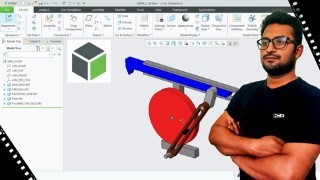

Learn Part Modeling, Assembly Design & Drawing in Creo Parametric. Become a Professional Creo Designer. 80+ Lectures covering all important tools.
What you’ll learn
- Confidently able work on Sketch Mode to create 2D Sketches.
- Able to use Dimensions, Constraints & Sketch Editing Tools.
- Confidently able to work on Part Modeling to create Basics & Complex parts.
- Confidently able to use Advance Modeling Tools like Patterns, Blends, Sweeps.
- Confidently able to work on Assembly Design Interface to create Assemblies.
- Able to use complex assembly joints like Cylinder, Planar & Slider Joints.
- Confidently able to work on Drawing Workbench for making drawings of both parts and assembly.
This course is completely dedicated to Part Modeling, Assembly Design & Drawing in Creo Parametric. This course will take you on a journey from nothing to a “Professional Creo Designer.” We have tried to make this course so comprehensive that you can get almost all demanding topics necessary in industries. So after completing this course you can easily able to create Basic or Complex 3D Models, Assembly & Drawings in Creo Parametric.
============================================================
Why you should take this course?
Firstly this course is made by the professional expert, who has more than 5 years of teaching experience and he knows how to make student understand every tools and topics.
There are 80+ Lectures covering almost all the tools that is important for Modelling in Creo.
An In-depth explanation of every tools that we have cover.
We keep on upgrading this course according to the feedback of the students, and all the upgrades are always free once you enrolled.
Topics That We Cover In this Course.
Sketch Mode: We will be learning about basic tools that are required for sketching your 2D Designs, We will learn about Different Shapes, Dimensions & Constraints and Sketch Editing Tools.
Part Design: This section will be our main focus, since Creo is widely used for it’s part modeling, So we will spent a little more time learning all the important tools & concepts of part modeling in Creo.
Assembly: In this section, we will be learning about the assembly design in Creo Parametric, we will be covering important concepts like constraints, joints and different important assembly features.
Drawing: Drawing is the final step of a product development, here we will going to convert our 3D Model into a 2D Drawing by printing it into standard papers, here we will be learning about different kinds of views & annotations that will help you in making drawing of Part & Assemblies.
Overview of What you will learn?
Brief understanding of the interface of the PTC Creo.
An introduction to sketch interface of Creo.
Learn to create basic shapes like lines, circles, rectangles, arcs, etc.
Concept of Strong and Weak Dimensions.
All about the use Mouse and Different Workspace Accessories.
Different methods of providing dimensions to a sketch like linear, Arc Length, Base Line Dimensions, etc.
Use of Constraints in an sketch, providing Constraints and Auto Constraints.
Different Sketch Editing tools like Trim, Fillets, Chamfer, Divide, with their important properties.
We will going to start Solid Modeling, with an introduction to it’s interface.
We will be learning about important concepts like, use of mouse, parametric nature, use of view toolbar.
How to create extruded feature and the use of remove material option.
How to create revolved feature and the use of remove material option.
We will be learning about Round Tool, i.e. fillets.
Different types of rounds and transitions in rounds.
Chamfer, its dimension cases, properties & transitions.
How to use Rib tool, Profile Rib & Trajectory Rib.
Shell Feature and Standard Hole Tool.
We will be learning about some important feature properties, like deleting, suppressing, reorder & reroute.
Learn to create different reference features like Planes, Axis & Points.
Learn to create different types of patterns in Creo.
We will be learning advance modeling tools in Creo.
How to use Sweep Feature and Merge Ends in Sweep.
Helical Sweep with Different Profiles.
Variable Pitch in Helical Sweep.
Blend tool in Creo.
Some More types of Blends, like Rotational Blend & Swept Blend.
We will be looking for the assembly design interface in Creo.
Covering important definitions and concepts related to assembly design like top down & Bottom Up Assemblies, Constraints, Degree of Freedom, etc.
Getting started with assembly and creating our first assembly of bush and shaft.
Learning the concepts of placement constraints like fix, coincident, concentric, distance, etc.
Learning different kinds of joints, like cylinder, planar & slider joints.
Learning important assembly features like Modifying & Repeat Component.
Finally, we will going to start the drawing interface.
How to use “General View” to get the views.
Different views like Projected, Auxiliary & Detailed View.
Learning Annotation tools like Solid Model Annotations.
More about annotations like adding dimensional & geometric tolerances.
Learn how to use note tool to provide text.
So, Overall it’s a complete course to learn part modeling in PTC Creo. And Don’t worry about your doubts, we are always there to help you during this course, Just Ask!
Who this course is for:
- Individuals intending to learn the basics of Creo Parametric.
- Individuals who wants to get started with 3D Modeling in Creo.
- Individuals wanting to get a better job via Creo skills.
- Designers, Engineers, Makers, and Hobbyist.
- Individuals who want to create their carrier in Product Design.
- Individuals working as a freelancer in CAD.
User Reviews
Be the first to review “PTC Creo Academy: Comprehensive Course on Creo for Beginners”
You must be logged in to post a review.




There are no reviews yet.