
Revit 2022: Complete Steel Structure “Warehouse” Modeling
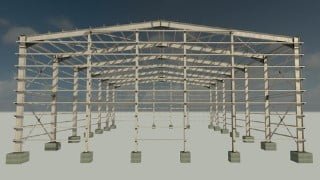

Learn how to model steel structure warehouses in Revit 2022 with this comprehensive course. From creating members to modifying connections, you’ll gain the skills needed to create complete models. Perfect for structural engineers and architects.
What you’ll learn
- Complete modeling of all steel structure warehouse members
- Create and modify steel connections between all members
- Steel Fabrication Elements ( plate, bolts, welds )
- Steel Modifiers ( shorten, contour cut )
- Insert standard sections for columns and beams from Revit library
Hello, welcome to
Revit 2022: Complete Steel Structure “Warehouse” Modeling
In this course, we will start modeling from start to finish without skipping a single step.
First, we will finish modeling the members of the steel structure warehouse using standard sections from Revit library, then we will add connections to all joints between the members using the downloaded Revit connections and we will customize or create our new connections.
The steel structure warehouse project will be divided into three courses, this course is for the modeling part, and it will cover all aspects of steel structure warehouse modeling in Revit, where we will explain in detail how to create a project from start to finish, including creating and modifying connections.
To get the most out of the course, it is preferable to open Revit and start applying step by step with videos.
Finally, at the end of the course, you will be able to create a complete Revit model for any steel structure warehouse or similar projects.
What you will learn in this course?
Starting new project
Editing project units
Modifying and creating levels
Modifying and creating grids
Inserting standard columns and beams section from Revit library
Creating portal frame
Creating horizontal bracing
Creating vertical and longitudinal bracing
Creating end gable columns
Creating isolated foundations
Creating purlins
Creating side girts
Creating end girts
Creating and modifying knee of frame connection
Creating and modifying apex connection
Creating and modifying purlins connection
Creating and modifying base plate connection
Creating and modifying horizontal bracing connection
Creating and modifying vertical and longitudinal connection
Creating and modifying side girts connection
Creating and modifying end girts connection
Creating and modifying end gable column connection
Creating and modifying eave purlin connection
Creating and modifying door header connection
Steel Connection ( duplicate type, modify parameters, customize, break )
Steel Fabrication Elements ( plate, bolts, welds )
Steel Modifiers ( shorten, contour cut )
Work Plane ( set work plane, show work plane, reference work plane )
And more…
Who this course is for:
- Structural engineers and it will also be useful for architects
User Reviews
Be the first to review “Revit 2022: Complete Steel Structure “Warehouse” Modeling”
You must be logged in to post a review.





There are no reviews yet.