
Substance Painter – Rune Sword
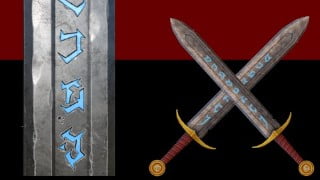

Learn the basics of Substance Painter and create AAA quality game assets with this beginner-level course. Texture your meshes and apply PBR textures, masks, and effects. Perfect for game developers and animators.
What you’ll learn
- Texturing a game asset in Substance Painter
- Baking mesh maps from high-poly to low-poly meshes
- What the different maps are and what they do for our mesh
- How to apply masks to layers and layer groups
- Use of paint and fill layers, filters, and generators
- Adding color variations, edge wear, dirt, ambient occlusion, post process effects, and more!
Welcome to the Substance Painter – Rune Sword Course!
This is a beginner level course teaching the basics of Substance Painter to create a AAA quality rune sword, complete with PBR textures (don’t worry, you’ll learn what those are), with emissive glowing runes that shine their magical light in the dark!
You’ll be introduced to Substance Painter and how to get your meshes into the software. This course uses the Rune Sword, modeled in my Blender Sculpting – Rune Sword course, but you’ll be provided with both the high and low poly mesh for this course!
We’ll learn all the basics of Substance Painter, including (but not limited to):
· Importing meshes
· Baking mesh maps
· What the mesh maps do for our materials and how to use them
· Layers
· The Layer Stack and Layer Groups
· Masking
· Adding fill layers and grunge maps
· Using curvature to get Edge Wear and highlights/shadows
· Filters, Modifiers, Post Processing Effects
· Realistic and Stylized techniques
· Hand-painted looks without the need to hand-paint
· Emissive materials and painting layers by hand
· Adjusting bake parameters to get the high-poly details onto the low poly mesh in an efficient manner
· Exporting textures and importing our meshes into Unreal Engine and Unity
· Creating the materials and applying the textures in both game engines
This course assumes you have access to Substance Painter. You can have a subscription or buy the program with a one-time payment through Steam. Students have also obtained student licenses to get a discount, so look into that!
By the end of the course, you’ll be able to professionally texture your meshes to make beautiful game assets! This is a great portfolio piece that you can add to your collection! All skills are explained in depth so you understand everything you’re doing and will be able to recreate these processes with your own models.
Jump in, and let’s create this beautiful Rune Sword together!
Who this course is for:
- Those who wish to use Substance Painter to texture their meshes and create AAA quality assets for their games or animations!
User Reviews
Be the first to review “Substance Painter – Rune Sword”
You must be logged in to post a review.




There are no reviews yet.