
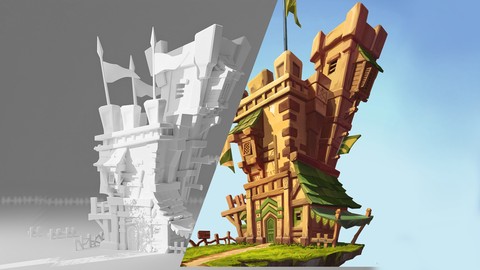
Texture paint a Castle in Blender 4.1 by Years of experience

What you’ll learn
- Use Blender and understand it’s interface
- Tips of UV Unwrapping, Know where to place mark seams
- How to use brash in blender
- Use Krita to change the look of your model in blender
- Project file is included
Welcome to our new course by Years of experience!
I am Morteza from artstudio313
This Course starts from learning fundamental of Blender and goes up to modeling and texture painting.
I use a lot of tips and techniques for hand painting.
I used graphic Tablet for texture painting but it will work with mouse as well but recommend using a graphic tablet.
UV Unwrapping
Next, we learn how to UV Unwrap those three models. You learn a lot about unwrapping such as mark seams and what they are and what they do and where should we add them how to unwrap hole model into on UV map.
Now we are ready to move into the shading tab. You learn how to create image texture and apply it to the model and prepare everything for Texture Painting tab.
In this tab, I tried to teach you the necessary tools for Texture Painting. I answered to questions like Why should we create multiple UV Map for multiple objects and more like that.
You will learn:
Modeling / low-poly
UV unwrapping in a very fast and easy and clever method
Where to place mark seams
What is bleed & what is used for
Brush setting and how to Paint the AO, shadow highlights
Texture paints the cuts and holes
Use your own brush and pain in a professional way
Texture painting problem solving like flipped normal
If you learn these parts, then you are ready to paint over any model in Blender.
We paint the models one by one, and each one has only one texture, which is ready to be used in game engine.
I hope you learn a lot from this trip journey 🙂
Who this course is for:
- Game Developers who wish to expand their Skill Set.
- People who are curious about the world of 3D modeling and animation.
- Artists who want to learn to bring their assets alive.
- This course can be your expanded version of the Blender manual.
User Reviews
Be the first to review “Texture paint a Castle in Blender 4.1 by Years of experience”
You must be logged in to post a review.




There are no reviews yet.