
Texturing & Cinematic Lighting in Blender
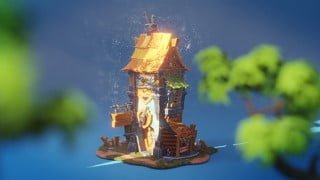

Learn the ins and outs of texturing and lighting in Blender with this comprehensive course. Improve your CG output and create professional and cinematic scenes. Perfect for game developers, 3D artists, and anyone curious about 3D modeling and animation. Downloadable models and scenes included.
What you’ll learn
- Use Blender and understand it’s interface
- Learn PBR texture and mix them to get even more interesting material
- Learn UV map and unwrap
- Project file is included
- Cinematic Lighting techniques
Hey, my name is Morteza Ebrahimi and this is the introduction of our new course, texturing and lighting in Blender!
This is an extensive video guide for those who want to learn ins and outs of texturing and lighting in blender to make every scene look more professional and as well cinematic.
For a long time, texturing and lighting has been one of the constant competitions for a quality output in the CG industry.
I can safely guess that the most common problems we all have encountered with texturing and lighting are: Why I get a stretchy result on my UV Mapp!
No matter what I do with lights, I feel it looks flat, and the problem is that I have no idea why?
It seems that only a CG artist can solve the mystery of this issue.
I believe that there is a simple and detailed texturing and lighting formula in this course, and if you use more or some of the boxes in this list, it will immediately improve the result.
It’s a list of techniques that must be known to see the best result on the render image. And fortunately, everyone can learn this quickly. actually, that’s what this course is all about
The course is 7 chapters from creating material to UV Unwrapping, texture , lighting and compositing.
Welcome to texturing and cinematic lighting in blender a premium course that offers a step-by-step guide for texturing and setting up a dramatic lighting in blender for pretty much anything using cycles
all the models and blender scenes that are needed for following along the videos or just checking the final result, come along with the course and will be available for downloading.
Who this course is for:
- Game Developers who wish to expand their Skill Set.
- People who are curious about the world of 3D modeling and animation.
- Artists who want to learn to bring their assets alive.
User Reviews
Be the first to review “Texturing & Cinematic Lighting in Blender”
You must be logged in to post a review.



There are no reviews yet.