
Ultimate Game AI for Unity Beginners
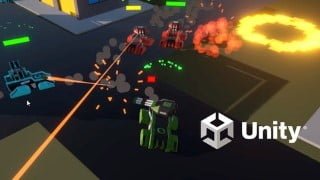

Learn how to implement a Game AI system in Unity and improve your game with decision making, pathfinding, and collaboration. This course covers key components such as Finite State Machines and Unity’s Navmesh system. Discover how to create unique AI personalities, from aggressive killing machines to tactical long-range attackers. The course includes a full project with examples, documented source code, and game assets. Perfect for beginners looking to enhance their game with AI.
What you’ll learn
- What is a Game AI and how can it improve your game
- What are the main components of a Game AI
- How to implement a Game AI System in Unity
- How to put everything together in a Game Project using Unity
By the end of this course you will implement your own AI System.
Find out the key components of a professional Game AI: Decision Making, Pathfinding and Compete & Collaborate.
Decision Making
Realtime decision making is one of the key components when creating a solid Game AI.
There are many ways to achieve this, be it either Finite State Machines, Behavior Trees, Planning.
The course focuses on Hierarchical Finite State Machines, an improvement over the original State Machines.
HFSM are currently used in modern games like Doom 2016. They are easy to understand and powerful.
—
Learn how a Finite State Machine works and how to use a Hierarchical State Machine for your own game project.
Pathfinding
Once a decision is made, the AI Agent needs to move from A to B. Here is where pathfinding comes into play.
In these days, the pathfinding component is integrated in the game engine itself.
In the hands-on project we will make use of Unity’s Navmesh System.
This course also focuses on teaching the core concepts of how a pathfinder works.
—
Learn how a pathfinder works and how to create one from 0.
Find out how to use Unitys Navmesh in a Game AI project.
Discover how to create cover points and use them accordingly when picking a final destination.
Compete & Collaborate
The last piece of the puzzle of a great AI is also in this course!
Having the AI Agents not only detect what’s around them by using sensors but also communicate between is a must in modern games.
—
Learn how to implement range, field of view, raycast, hit detection and communication.
Find out how to give unique personalities to your AI Agents for a superior game experience
AI Personality: Aggressive
Meet the Agressive AI! Made to seek & kill with a low chance of retreat, this is the perfect killing machine!
It’s main features are a linear projectile, a range sensor combined with raycast and a low chance of retreat.
—
Learn how to put together an AI Agent that seeks to kill.
AI Personality: Defensive
Combining attacking with defense is another way to approach a fight. And this is how this AI operates.
Its main features are rocket projectiles, range/raycast sensors and a 50-50% attack/retreat chance.
—
Learn how to put together a balanced AI Agent that not only seeks the target but also the nearest good cover.
AI Personality: Tactical
This AI never attacks directly. By having a long range sensor and no raycast, once the enemy is detected a vantage point will be also determined.
The Tactical AI goes to cover, adjusts for missed hits and fires a long-range projectile.
—
Learn how to put together an AI Agent that uses long-range projectiles, adjusts for errors.
Full Game AI Project Included
You will get not only the examples, but also a full project that features an AI System ready to be used in a game – yes, yours included!
What you will be getting:
Relevant examples for each implementation part
Full modular project that you can explore and reuse for your game
Hierarchical Finite State Machines are used to implement the AI logic
Documented Source Code files in C#
3 Types of AIs: Aggressive, Defensive and Tactical
3 Projectile Types: Shell, Rocket and Mortar
2 Types of Firing mode: Normal and Burst
2 Patrol modes: Waypoints, Random Movement (interchangeable at runtime)
AI Communication System – propagate information between agents
Full Player Movement and Firing System
Game Assets – Buildings, Tanks and props
Everything properly organized in a tidy file structure, prefabs, modular components and more
Who this course is for:
- Beginners with Artificial Intelligence in Unity
User Reviews
Be the first to review “Ultimate Game AI for Unity Beginners”
You must be logged in to post a review.




There are no reviews yet.